 Install and use gem invisible_captcha with devise (and the 5 traps to avoid)
Quick guide to add gem invisible_captcha to your devise registrations.
Why? For fewer bots to sign up! And unlike reCAPTCHA, there is nothing for a real human to solve.
Final result:
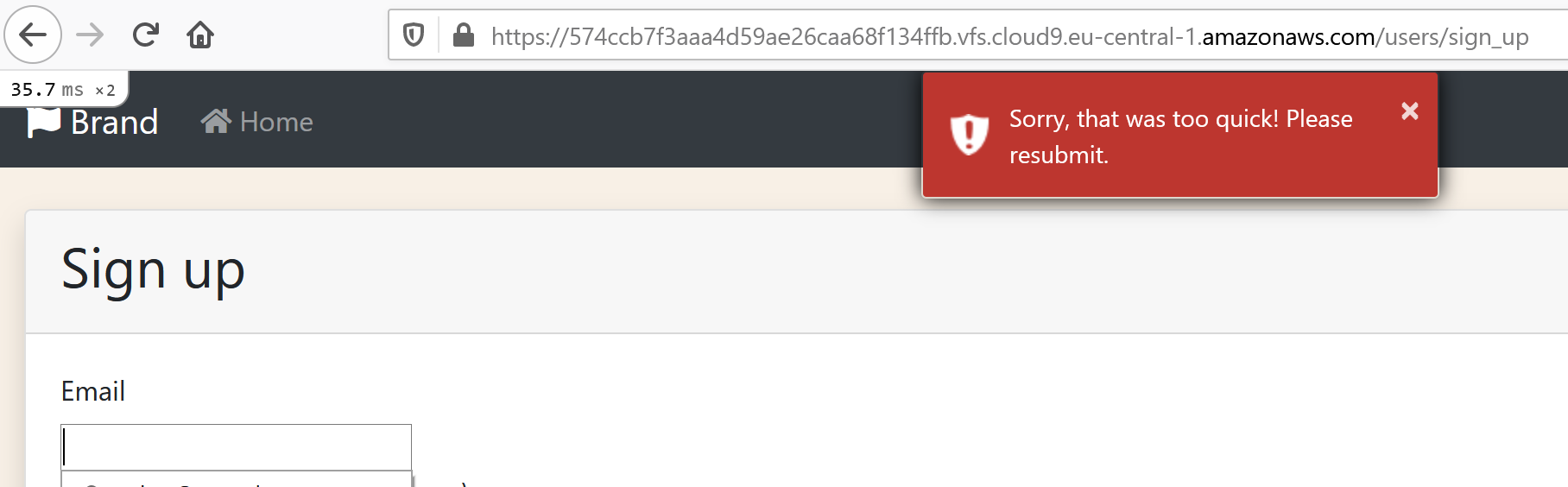

Update, August 2026. I have since run this gem in production on public, unauthenticated forms — the kind a bot finds within a day of the URL going live. The five-minute install below is still correct, but the defaults have sharp edges that only show up under real traffic: honeypots that silently stop working, a timing check that throws away what the user typed, and a hidden field that screen readers announce out loud. Everything after the install section is what I wish the README had told me.
The five-minute install #
gemfile:
gem 'invisible_captcha'
console:
bundle
rails g devise:controllers users -c=registrations
app/controllers/users/registrations_controller.rb
class Users::RegistrationsController < Devise::RegistrationsController
  invisible_captcha only: [:create]
end
routes.rb:
devise_for :users, controllers: {
  registrations: 'users/registrations'
}
app/views/devise/registrations/new.html.erb, inside the form:
<%= invisible_captcha %>
That is the whole happy path, and it does work. Now the parts that bit me.
Trap 1: the default honeypot names are random per process #
This is the one that costs you the whole feature without a single error in the log.
InvisibleCaptcha.honeypots is lazily memoized:
def honeypots
  @honeypots ||= (1..5).map { generate_random_honeypot }
end
Five random strings, invented inside whichever process asked first. The view renders honeypots.sample as the field name. The controller then checks the incoming params against its own list.
In development, one process renders and validates — it works. In production you have several Puma workers, probably several machines. Worker A renders a form with a field named qmzjxrvbdk; worker B receives the POST, loops over the five names it generated, sees none of them, finds no spam, and lets the bot through. The honeypot does nothing, quietly, forever. A deploy or a worker restart breaks it the same way.
It also makes the field untestable — you cannot assert that bots are blocked if you cannot name the field.
Pin the list:
# config/initializers/invisible_captcha.rb
InvisibleCaptcha.setup do |config|
  config.honeypots = %w[subtitle_ic nickname_ic company_ic address_ic website_ic]
end
Pick names a naive bot would plausibly want to fill (nickname, company, website), and suffix them so they can never collide with a real attribute on the form.
Trap 2: timestamp_threshold is global, and 4 seconds is a long time #
The gem rejects a submission that arrives sooner than timestamp_threshold seconds after the form was rendered. The default is 4, and it applies to every protected form in the app.
Four seconds is reasonable for a form with real compose time. It is completely wrong for a short one. I had a lookup form with a single input — paste a code, press enter. A human does that in under a second, and got told “Sorry, that was too quick! Please resubmit.” That is a bug report, not spam protection.
The worse version of this problem is the one you haven’t hit yet: as a global default, 4 seconds silently applies to every short form anyone adds to the app later.
So invert it. Keep the global default permissive, and raise it only where the form actually takes time to fill in:
# config/initializers/invisible_captcha.rb
# Short forms (paste an email or an access code, hit enter) legitimately submit
# in about a second. Controllers guarding a form with real compose time raise
# the threshold themselves.
config.timestamp_threshold = 1
class ReportsController < ApplicationController
  invisible_captcha only: :create, timestamp_threshold: 4
end
Trap 3: the default timing failure throws the submission away #
Look at what on_timestamp_spam does when you don’t configure it:
flash[:error] = InvisibleCaptcha.timestamp_error_message
redirect_back(fallback_location: root_path)
A redirect. Everything the user typed is gone.
That would be fine if only bots ever tripped the check. They don’t. The timestamp lives in the session under a single key, and it is deleted on read:
timestamp = session.delete(:invisible_captcha_timestamp)

unless timestamp
  warn_spam("Timestamp not found in session.")
  return true
end
So a real user is treated as a bot when:
- they submit twice from the same open tab. The first POST consumed the timestamp. If your action didn’t re-render the form, the second POST has nothing in the session.
-
there is no session at all. Cookies cleared, session expired during a long compose,
secret_key_baserotated between render and submit, privacy-mode browser. Missing timestamp is treated as spam, not as “unknown”. - they have two tabs open. One session key, one slot — the second render overwrites it, and the first tab is now holding a timestamp that no longer exists.
On a short signup form, losing the input is annoying. On a long, high-stakes one — a whistleblower report, a job application, a detailed bug report — it is much worse than the spam you prevented. Re-render instead:
class ReportsController < ApplicationController
  invisible_captcha only: :create,
                    timestamp_threshold: 4,
                    on_timestamp_spam: :submitted_too_quickly

  def create
    # ...
  end

  private

  def submitted_too_quickly
    @report = Report.new(report_params)
    flash.now[:alert] = "That was quick! Please check your report and submit it again."
    render :new, status: :unprocessable_content # :unprocessable_entity before Rails 8
  end
end
Two details make this work:
-
Re-rendering
:newruns<%= invisible_captcha %>again, which writes a fresh timestamp into the session. So the resubmit actually succeeds. (A plain redirect also issues a fresh timestamp — it just does it after discarding the user’s work.) -
Your handler must render or redirect. The gem does
on_timestamp_spam(options)thenreturn if performed?. If your method responds with nothing, execution falls straight through to the honeypot check and your action runs as normal.
Keep the honeypot branch silent, though. Its default on_spam is head(200) — the bot gets a bland 200 and learns nothing about what it hit. Only the timing branch has false positives, so only the timing branch deserves a friendly error.
Trap 4: the spinner invalidates your other open tabs #
spinner_enabled is on by default. On render, the gem stores one value in the session and embeds it as a hidden field; on submit, it compares the two.
One session, one slot:
session[:invisible_captcha_spinner] = InvisibleCaptcha.encode(...)
Open a protected form in tab A. Open a different protected form in tab B. B’s render overwrites the slot, so A’s hidden field is now stale. Submit A and you get a spinner mismatch, which means head(200): no redirect, no flash, no error, no record. From the user’s side the button simply does nothing.
Two protected forms plus ordinary tabbed browsing is all it takes. I turned it off:
# The spinner is stored once per session, so opening another protected form
# invalidates forms already open in other tabs. Honeypots, timestamps, and
# endpoint rate limits provide the intended layered protection without it.
config.spinner_enabled = false
Pin that decision with a test, so a future “let’s enable all the protections” commit has to argue with CI:
test "spinner validation stays disabled so parallel forms cannot invalidate each other" do
  assert_not InvisibleCaptcha.spinner_enabled
end
Trap 5: screen readers can see your honeypot #
The gem hides the field with an inline <style> block, and picks the hiding technique at random on every render:
def css_strategy
  [
    "display:none;",
    "position:absolute!important;top:-9999px;left:-9999px;",
    "position:absolute!important;height:1px;width:1px;overflow:hidden;"
  ].sample
end
Only the first one removes the field from the accessibility tree. The other two just move it out of sight. So roughly two renders out of three, a screen reader user is offered a text field labelled “If you are a human, ignore this field” — and if they don’t ignore it, their submission is silently discarded as spam. The randomness is the nasty part: it will look fine every time you test it manually.
Wrap the helper:
<div aria-hidden="true" inert>
  <%= invisible_captcha %>
</div>
aria-hidden takes it out of the accessibility tree regardless of which CSS the gem rolled, and inert keeps it out of the tab order and unreachable by programmatic focus, on top of the tabindex="-1" the gem already sets.
While we’re here — this is also the strongest argument for a honeypot over a visual challenge. WCAG 2.2 §3.3.8 (Accessible Authentication) prohibits cognitive function tests in an authentication flow: puzzles, image recognition, transcribing distorted characters. A honeypot asks the user for nothing at all, so it passes. “Select all squares with a bus” does not.
Smaller things worth knowing #
Content Security Policy. That inline <style> tag needs a nonce under a strict CSP:
<%= invisible_captcha nonce: true %>
Note the option isn’t consumed — it also ends up as a stray nonce attribute on the input. Harmless, but moving the styles into the layout is cleaner:
config.injectable_styles = true
<%# in your layout's <head> %>
<%= invisible_captcha_styles %>
The helper writes to the session on GET. Rendering the form sets session[:invisible_captcha_timestamp], which means a Set-Cookie on every page that contains a protected form. Those pages can no longer be cached as anonymous by a CDN.
Debugging is already wired up. Every rejection logs and emits ActiveSupport::Notifications under invisible_captcha.spam_detected, with the IP, user agent, controller, action and filtered params. Subscribe to it before you start guessing why submissions are vanishing.
The setup I ended up with #
# config/initializers/invisible_captcha.rb
InvisibleCaptcha.setup do |config|
  config.visual_honeypots = false

  # Short forms (paste an email or an access code, hit enter) legitimately
  # submit in about a second, so the default stays permissive. Controllers
  # guarding a form with real compose time raise it themselves.
  config.timestamp_threshold = 1
  config.timestamp_enabled = !Rails.env.test?

  # The spinner is stored once per session, so opening another protected form
  # invalidates forms already open in other tabs. Honeypots, timestamps, and
  # endpoint rate limits provide the intended layered protection without it.
  config.spinner_enabled = false

  # Pinned, not random: the default list is generated per process, so a form
  # rendered by one worker is validated against a different list by another.
  config.honeypots = %w[subtitle_ic nickname_ic company_ic address_ic website_ic]
end
class ReportsController < ApplicationController
  # Honeypot spam (a bot filling hidden fields) is dropped silently via the gem
  # default. Timestamp "spam" — a too-fast submit, or a missing session
  # timestamp — happens to genuine users, so re-render with their input intact
  # instead of the gem's default redirect, which discards it.
  invisible_captcha only: :create,
                    timestamp_threshold: 4,
                    on_timestamp_spam: :submitted_too_quickly

  rate_limit to: 5, within: 10.minutes, only: :create
end
<%= form_with model: @report do |f| %>
  <div aria-hidden="true" inert>
    <%= invisible_captcha %>
  </div>

  <%# ... %>
<% end %>
Testing it #
Disable the timing check in the test environment (config.timestamp_enabled = !Rails.env.test?, above), otherwise every controller test that POSTs directly to a create action fails — no rendered form means no session timestamp means “spam”.
Then test the two behaviors on purpose:
test "honeypot submission is silently dropped" do
  honeypot = InvisibleCaptcha.honeypots.first

  assert_no_difference "Report.count" do
    post reports_url, params: { report: { body: "spam" }, honeypot => "I am a bot" }
  end

  assert_response :success
end

test "a too-fast submit re-renders the form with the body preserved" do
  InvisibleCaptcha.stubs(:timestamp_enabled).returns(true)

  assert_no_difference "Report.count" do
    post reports_url, params: { report: { body: "Payroll fraud in the Berlin office" } }
  end

  assert_response :unprocessable_content
  assert_select "textarea", text: /Payroll fraud/
ensure
  InvisibleCaptcha.unstub(:timestamp_enabled)
end
The first test is only possible because the honeypot names are pinned — which is Trap 1 paying for itself.
Is it still worth it? #
Yes, for any public form. It costs the user nothing, it costs you one line in a view, and it clears out the volume of low-effort bots that fill every field they find.
Just be honest about the ceiling: a honeypot stops scripts that don’t read your HTML. It does not stop a script written for your form, and neither does a timing check. Layer it — the honeypot for the bulk, rate_limit for the targeted ones, and moderation for whatever gets through.
Alternative wiki to install Google REcaptcha gem — worth knowing about, but note the §3.3.8 problem above before you put it in a signup flow.
Did you like this article? Did it save you some time?