---
title: "Use YouTube API with Ruby on Rails"
author: "Yaroslav Shmarov"
date: "2023-05-30"
canonical_url: "https://blog.superails.com/youtube-api"
markdown_url: "https://blog.superails.com/youtube-api.md"
description: "I've got 150+ videos on @SupeRails Youtube channel, and now I want to list them on my own superails.com website."
tags: ["ruby","rails","youtube","api"]
license: "GNU AGPL v3. Credit Yaroslav Shmarov and link the canonical URL."
video_url: "https://www.youtube.com/watch?v=XWuQAtVEJLk"
---
# Use YouTube API with Ruby on Rails
I've got 150+ videos on [@SupeRails Youtube channel](https://www.youtube.com/@SupeRails/), and now I want to list them on my own [superails.com](https://superails.com) website.
I could copypaste the information manually, but that would take ages.
I could use web scraping, but what's the point, if there is an easy to use Youtube API?
Youtube API is accessible in Ruby via the [gem 'google-api-client'](https://github.com/googleapis/google-api-ruby-client)
### 1. Generate a Youtube API key
First,
[access Google Cloud Console](https://console.cloud.google.com/apis/credentials?project=superails-315915).
Search for
[YouTube Data API v3](https://console.cloud.google.com/marketplace/product/google/youtube.googleapis.com?q=search&referrer=search&project=superails-315915):
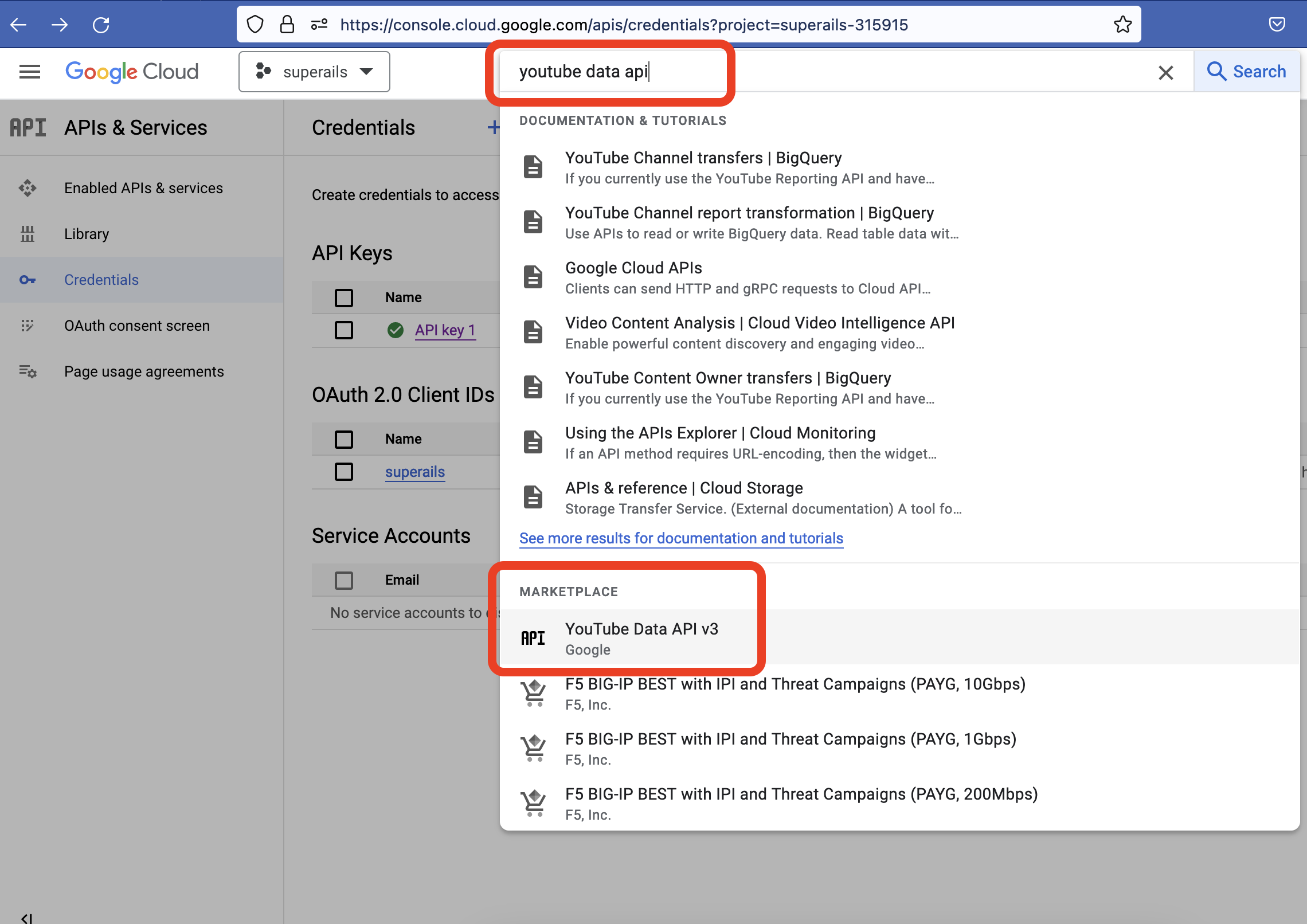
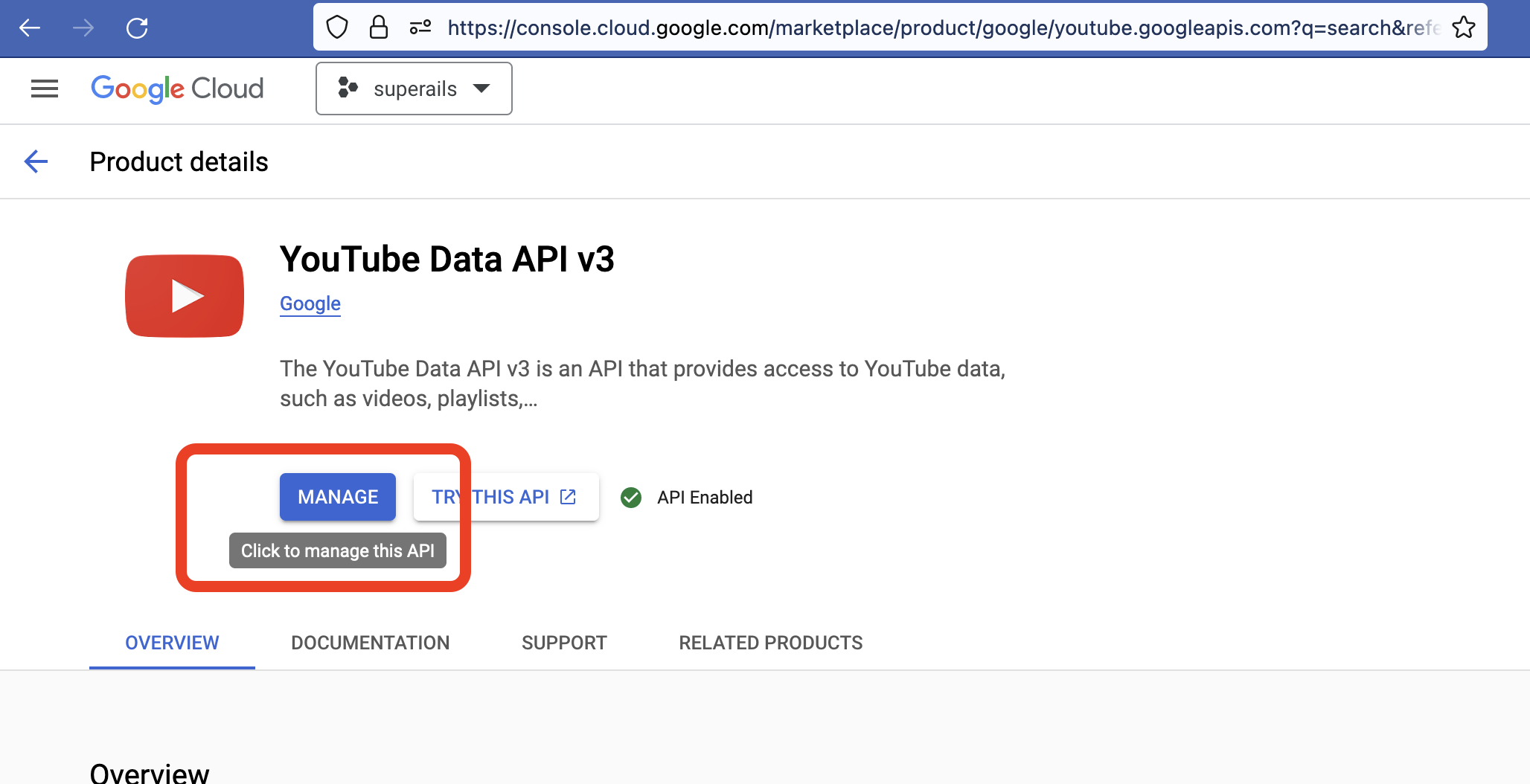
Click to enable the API:
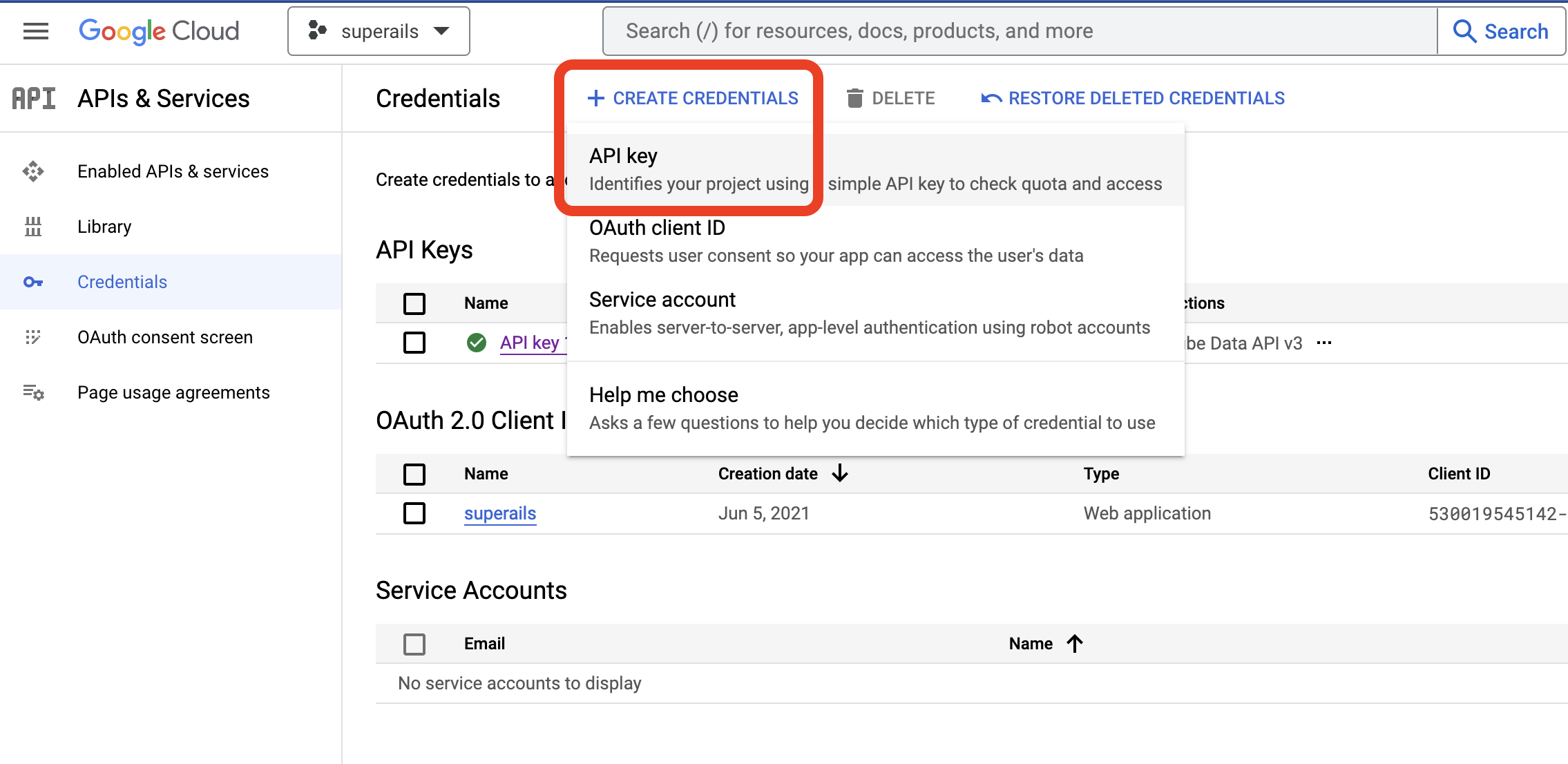
Create an API key:
View [Youtube API docs](https://developers.google.com/youtube/v3/docs/videos)
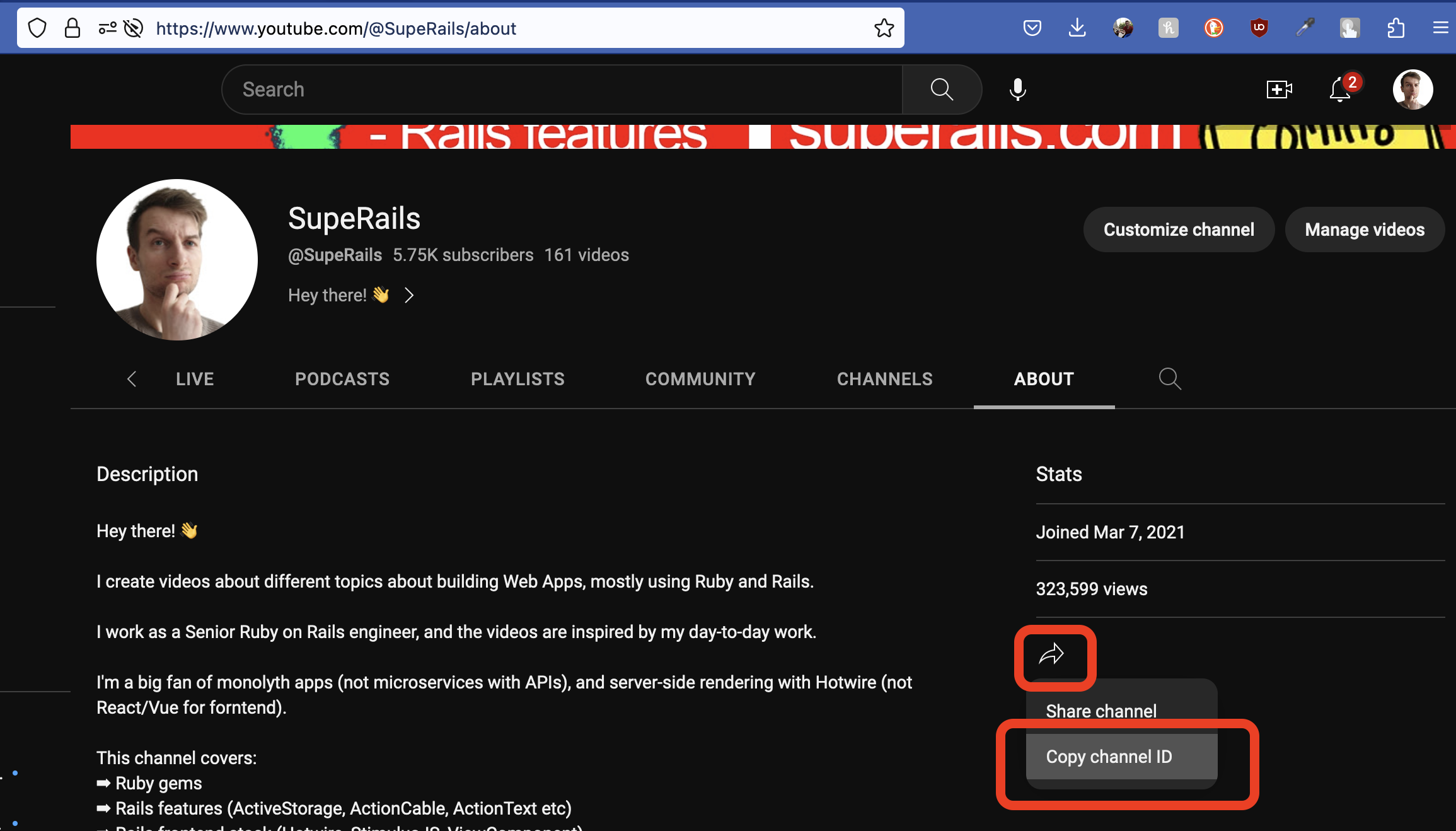
### 2. Find a youtube channel ID
To make the API call to list videos, you need to provide a channel ID. Here's how you can access any channel ID:
### 3. API call to list all videos on a channel
Install the gem:
```ruby
# Gemfile
# gem 'google-api-client' # https://github.com/googleapis/google-api-ruby-client
gem 'google-apis-youtube_v3'
```
Make a `list_searches` API call to get up to 50 videos per page form the selected channel.
```ruby
# rails c
require 'google/apis/youtube_v3'
CHANNEL_ID = 'UCyr6ZTmztFW3FB4qG_97FoA'
YOUTUBE_KEY = 'MySecretKey'
youtube = Google::Apis::YoutubeV3::YouTubeService.new
youtube.key = YOUTUBE_KEY
# list videos and playlists
response = youtube.list_searches('snippet', channel_id: CHANNEL_ID, max_results: 50)
# list only videos
response = youtube.list_searches('snippet', channel_id: CHANNEL_ID, max_results: 5, type: 'video')
```
This will provide you basic information about up to 50 videos per page.
### 4. API call to show details of one video
If you want to have more detailed info about a specific video, you should make a `list_videos` API call while passing the `video_id`.
```ruby
# rails c
require 'google/apis/youtube_v3'
CHANNEL_ID = 'UCyr6ZTmztFW3FB4qG_97FoA'
YOUTUBE_KEY = 'MySecretKey'
youtube = Google::Apis::YoutubeV3::YouTubeService.new
youtube.key = YOUTUBE_KEY
video_id = "07XQY8nRvd0"
video_response = youtube.list_videos('snippet', id: video_id)
```
### 5. Import Youtube videos into a Rails app
Genarate a `Post` model, and jobs to make async API calls:
```
rails g model Post video_id title description:text tags:text published_at:datetime cover_image_url
rails g job Youtube::ListVideosJob
rails g job Youtube::CreateVideoJob
```
The API call will give us tags as an array, so let's store them as such:
```ruby
# app/models/post.rb
serialize :tags, Array
```
Job to LIST and Paginate all the videos on a Youtube channel:
```ruby
# app/jobs/youtube/list_videos_job.rb
require 'google/apis/youtube_v3'
# Youtube::ListVideosJob.perform_later
class Youtube::ListVideosJob < ApplicationJob
queue_as :default
CHANNEL_ID = Rails.application.credentials.dig(:youtube, :channel_id)
YOUTUBE_KEY = Rails.application.credentials.dig(:youtube, :youtube_key)
def perform
youtube = Google::Apis::YoutubeV3::YouTubeService.new
youtube.key = YOUTUBE_KEY
video_ids = fetch_all_videos(youtube)
process_videos(video_ids)
end
private
def fetch_all_videos(youtube)
video_ids = []
next_page_token = nil
loop do
response = youtube.list_searches('snippet', channel_id: CHANNEL_ID, max_results: 50, page_token: next_page_token)
response_ids = response.items.map { |item| item.id.video_id }.compact
video_ids += response_ids
next_page_token = response.next_page_token
break if next_page_token.nil?
end
video_ids
end
def process_videos(video_ids)
video_ids.each do |video_id|
Youtube::CreateVideoJob.perform_later(video_id)
end
end
end
```
Job to get detailed info for a specific youtube video and create a local record:
```ruby
# app/jobs/youtube/create_video_job.rb
require 'google/apis/youtube_v3'
# Youtube::CreateVideoJob.perform_later
class Youtube::CreateVideoJob < ApplicationJob
queue_as :default
CHANNEL_ID = Rails.application.credentials.dig(:youtube, :channel_id)
YOUTUBE_KEY = Rails.application.credentials.dig(:youtube, :youtube_key)
def perform(video_id)
youtube = Google::Apis::YoutubeV3::YouTubeService.new
youtube.key = YOUTUBE_KEY
video_response = youtube.list_videos('snippet', id: video_id)
video = video_response.items.first.snippet
video_hash = {
video_id: video_id,
title: video.title,
description: video.description,
tags: video.tags,
published_at: video.published_at,
cover_image_url: video.thumbnails.maxres.url
}
Post.find_or_create_by(video_id: video_hash[:video_id]).update(video_hash)
end
end
```
### 6. Display videos in a view:
```html
<% @posts.each do |post| %>
<%= post.title %>
<%= post.description %>
<% end %>
```
Example fixture of a stored video:
```yaml
one:
youtube_video_id: "Ubrr9mqE94o"
title: "Ruby on Rails #27 Gem Letter Opener - best way to preview emails in development"
description: "gem letter_opener:\nhttps://github.com/ryanb/letter_opener\nSource Code for the Post:\nhttps://github.com/corsego/26-action-mailer/commit/24fb10065fb5c4502b15ea75d651aec8e61413e0\n\nTo fix Launchy error - run these commands in console:\nexport BROWSER=/dev/null\nexport LAUNCHY_DRY_RUN=true"
tags: ["ruby", "rails", "ruby on rails", "tutorial", "programming"]
published_at: "2021-05-19T13:00:15Z"
cover_image_url: "https://i.ytimg.com/vi/Ubrr9mqE94o/maxresdefault.jpg"
```