---
title: "#12 Turbo: Pagination with gem Pagy, ViewComponent without page refresh"
author: "Yaroslav Shmarov"
date: "2021-11-02"
canonical_url: "https://blog.superails.com/turbo-view-component-pagination"
markdown_url: "https://blog.superails.com/turbo-view-component-pagination.md"
description: "Pagination with Turbo without page refresh: console optionally, update the default gem configuration add the pagination element optionally, add a beautified…"
tags: ["ruby","rails","ruby-on-rails","hotwire","turbo","view-component","pagination","pagy"]
license: "GNU AGPL v3. Credit Yaroslav Shmarov and link the canonical URL."
---
# #12 Turbo: Pagination with gem Pagy, ViewComponent without page refresh
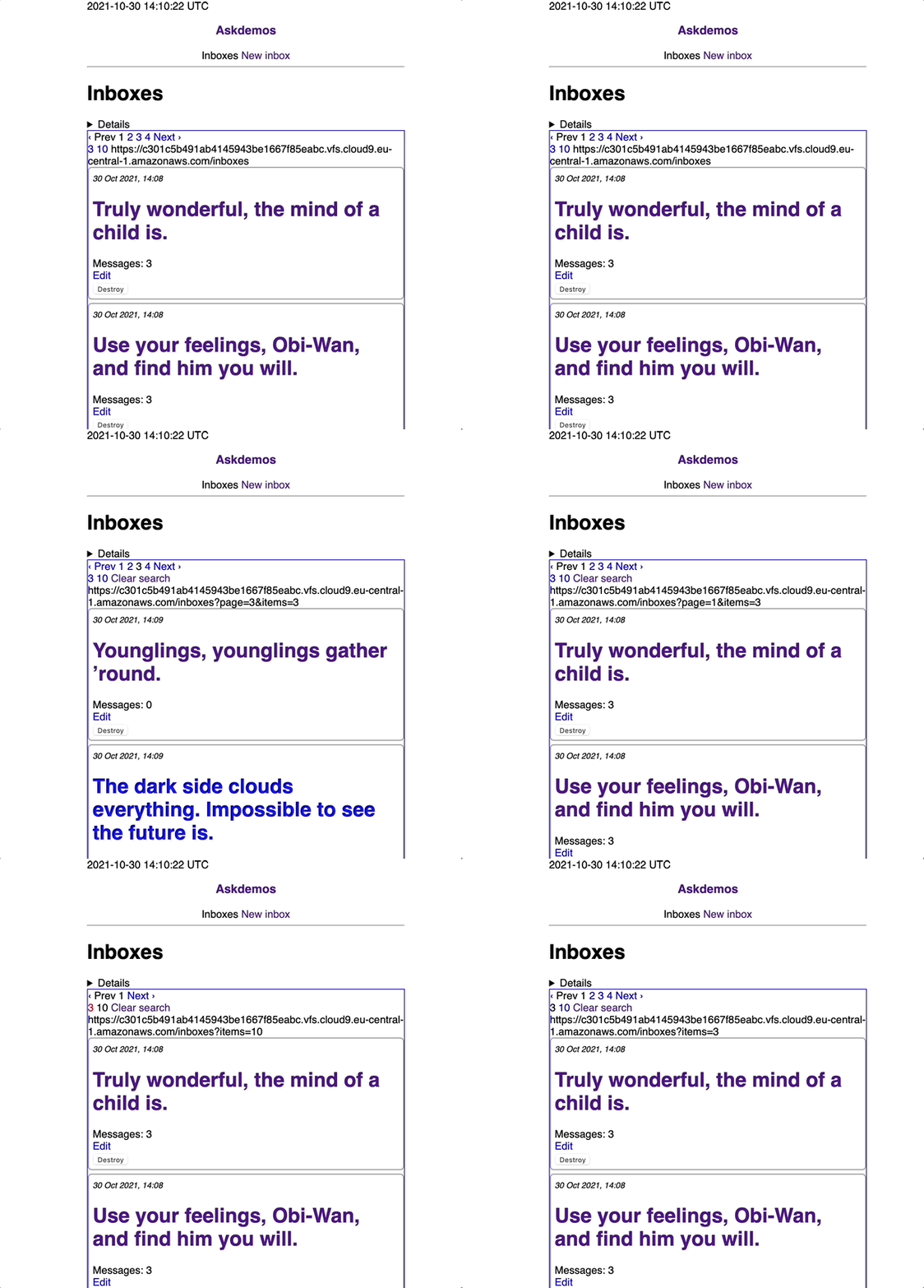
Pagination with Turbo without page refresh:
### 1. Install Pagy
console
```sh
bundle add pagy
```
#app/controllers/application_controller.rb
```diff
++ include Pagy::Backend
```
#app/helpers/application_helper.rb
```diff
++ include Pagy::Frontend
```
#app/controllers/inboxes_controller.rb
```diff
def index
-- @inboxes = Inbox.order(created_at: :desc)
++ # @pagy, @posts = pagy(Inbox.order(created_at: :desc), items: 5)
++ @pagy, @inboxes = pagy(Inbox.order(created_at: :desc))
end
```
* optionally, update the default gem configuration
```ruby
# config/initializers/pagy.rb
# See https://ddnexus.github.io/pagy/api/pagy#instance-variables
Pagy::DEFAULT[:page] = 1 # default page to start with
Pagy::DEFAULT[:items] = 3 # items per page
Pagy::DEFAULT[:cycle] = true # when on last page, click "Next" to go to first page
require 'pagy/extras/items'
Pagy::DEFAULT[:max_items] = 100 # max items possible per page
require 'pagy/extras/overflow'
Pagy::DEFAULT[:overflow] = :last_page # default (other options: :empty_page and :exception)
```
* add the pagination element
* optionally, add a beautified element, like bootstrap
* optionally, add links to other quantity of items per page
```diff
# app/views/inboxes/index.html.erb
++ <%= @inboxes.count %>
++ <%= @pagy.count %>
++ <%= link_to_unless_current "10", inboxes_path(items: 10) %>
++ <%= link_to_unless_current "50", inboxes_path(items: 50) %>
++ <%== pagy_nav(@pagy) %>
-- <%#= raw pagy_nav(@pagy) %>
-- <%#== pagy_bootstrap_nav(@pagy) %>
```
### 2. Pagination with Turbo Frames
* just wrap everything into a turbo frame
* you can add a link to "refresh" just the content just inside the frame
* you can also add `request.url` to see the search query inside the frame
```diff
# app/views/inboxes/index.html.erb
++ <%= turbo_frame_tag 'search' do %>
<%= link_to_unless_current "10", inboxes_path(items: 10) %>
<%= link_to_unless_current "50", inboxes_path(items: 50) %>
++ <%= link_to 'Clear search', request.path if request.query_parameters.any? %>
++ <%= request.url %>
<%= render @inboxes %>
<%== pagy_nav(@pagy) %>
++ <% end %>
```
**HOWEVER in the above case, ALL navigation is scoped to the turbo frame.**
You will want to make only pagination links work within the turbo_frame, so that you can navigate to an Inbox/show page, for example
* add `, target: '_top'` to the `turbo_frame_tag`
* add `, data: { turbo_frame: 'search' }` to the links that should be scoped to the `search` frame
```diff
# app/views/inboxes/index.html.erb
<%= turbo_frame_tag 'search', target: '_top' do %>
-- <%= link_to_unless_current "10", inboxes_path(items: 10) %>
-- <%= link_to_unless_current "50", inboxes_path(items: 50) %>
-- <%= link_to 'Clear search', request.path if request.query_parameters.any? %>
++ <%= link_to_unless_current "3", inboxes_path(items: 3), data: { turbo_frame: 'search' } %>
++ <%= link_to_unless_current "10", inboxes_path(items: 10), data: { turbo_frame: 'search' } %>
++ <%= link_to 'Clear search', request.path, data: { turbo_frame: 'search' } if request.query_parameters.any? %>
<%= request.url %>
<%= render @inboxes %>
<%== pagy_nav(@pagy) %>
<% end %>
```
Next, update the `<%== pagy_nav(@pagy) %>`:
* [adding attributes to pagy 1](https://ddnexus.github.io/pagy/how-to.html#customizing-the-link-attributes){:target="blank"}
* [adding attributes to pagy 2](https://github.com/ddnexus/pagy/blob/master/docs/api/frontend.md#extra-attribute-strings){:target="blank"}
```diff
# app/controllers/inboxes_controller.rb
def index
-- @pagy, @inboxes = pagy(Inbox.order(created_at: :desc))
++ @pagy, @inboxes = pagy(Inbox.order(created_at: :desc), link_extra: 'data-turbo-frame="search"')
end
```
### 3. Install ViewComponent. Add pagination into a component.
Gemfile
```ruby
gem "view_component", require: "view_component/engine"
```
```sh
# console
bin/rails generate component Pagination results
```
* initialize pagy in the view component
```diff
# app/components/pagination_component.rb
class PaginationComponent < ViewComponent::Base
++ include Pagy::Frontend
++ attr_reader :results
def initialize(results:)
@results = results
end
end
```
* render pagy in the view component view
```diff
# app/components/pagination_component.html.erb
++ <%== pagy_nav(results) %>
```
* render the pagination component on the index page
```diff
# app/views/inboxes/index.html.erb
++ <%= render PaginationComponent.new(results: @pagy) %>
```
****
That's it!
Althrough, it is a problem that there is no simple way to update URL when using turbo.
This way, when you refresh the page, the filters and page don't persist.
However there is [a PR for this](https://github.com/hotwired/turbo/pull/398){:target="blank"}
If I find a reliable way to do it with Turbo Drive, I will add it here.
Resources:
* [gem ViewComponent](https://github.com/github/view_component){:target="blank"}
* [gem Pagy](https://github.com/ddnexus/pagy){:target="blank"}
* [example pagy integtation](https://github.com/corsego/19-pagy/commit/266eba00f74e37414b76711e33a97e2c6e5dab1e){:target="blank"}