---
title: "Semantic HTML in Ruby on Rails"
author: "Yaroslav Shmarov"
date: "2022-05-02"
canonical_url: "https://blog.superails.com/semantic-html-in-rails"
markdown_url: "https://blog.superails.com/semantic-html-in-rails.md"
description: "Often when writing an HTML page we resort to div and span, whereas there are many other HTML tags that we just tend to overlook or forget."
tags: ["rails","html"]
license: "GNU AGPL v3. Credit Yaroslav Shmarov and link the canonical URL."
video_url: "https://www.youtube.com/watch?v=_7Hk8EPpr-U"
---

# Semantic HTML in Ruby on Rails

Often when writing an HTML page we resort to `div` and `span`, whereas there are many other HTML tags that we just tend to overlook or forget.

Writing semantic HTML means actually using the right HTML tags for different parts of a page.
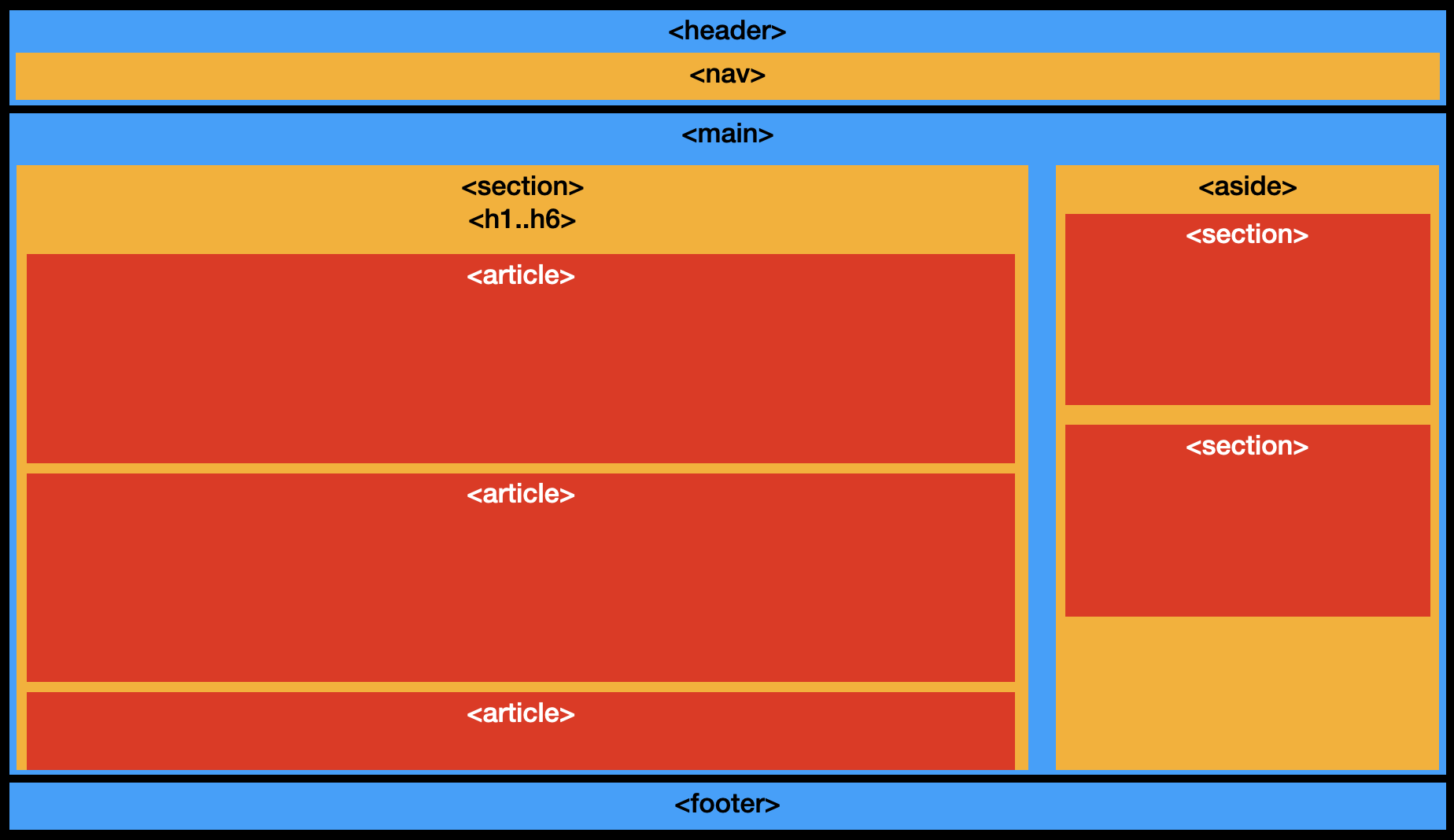
![semantic-html](https://blog.superails.com/assets/images/semantic-html.png)

Semantic HTML is important for accessibility, screen readers, SEO. And just looks more professional ;)

Good resources on writing semantic HTML:
* [MDN HTML API](https://developer.mozilla.org/en-US/docs/Web/HTML/Element)
* [CSS tricks:  How to Section Your HTML](https://css-tricks.com/how-to-section-your-html/)

### Example of utilizing semantic HTML in a Ruby on Rails app:

* `<header>` for logao and navigation
* `<main>` for `<%= yield %>`
* `<footer>` - sitemap, copyright, author, contact, sitemap, back-to-top

```ruby
# app/views/layouts/application.html.erb

<body>
  <header>
    <%= render "shared/navbar" %>
  </header>
  <main>
    <%= render "shared/flash" %>
    <%= render "shared/sidebar" %>
    <%= yield %>
  </main>
  <footer>
    <%= render "shared/footer" %>
  </footer>
            <script>
                window.onload = function () {
                    var script = document.createElement('script');
                    var firstScript = document.getElementsByTagName('script')[0];
                    script.type = 'text/javascript';
                    script.async = true;
                    script.src = '/sw-register.js?v=' + Date.now();
                    firstScript.parentNode.insertBefore(script, firstScript);
                };
            </script>
            </body>

```

* `<nav>` to define navbar
* unstiled list of links inside the `<nav>` for navigation

```ruby
# app/views/shared/_navbar.html.erb
<nav>
  <ul>
    <li>
      <%= link_to "Home", root_path %>
    </li>
    <li>
      <%= link_to "Posts", posts_path %>
    </li>
  </ul>
</nav>
```

* `<aside>` for sidebar (related links, advertisements)

```ruby
# app/views/shared/_sidebar.html.erb
<aside>
  ...
</aside>
```

* `<section>` should usually have a heading `<h1>`-`<h6>`

```ruby
# app/views/posts/index.html.erb
<section>
  <h1>Posts</h1>
  <%= render @posts %>
</section>
```

```ruby
# app/views/posts/show.html.erb
<section>
  <h1>Post <%= @post.id %><h1>
  <%= render @post %>
</section>
```

```ruby
# app/views/posts/new, edit
<section>
  <h1>Create/Edit post<h1>
  ...
</section>
```

* `<article>` - an object that makes sence outside of other context

```ruby
# app/views/posts/_post.html.erb
<article>
  <%= @post.title %>
  <%= @post.body %>
</article>
```

The above is my current-best approach.

If you have any suggestions on how to make it better, please tell me!
