---
title: "Hotwire Turbo: Edit each attribute inline"
author: "Yaroslav Shmarov"
date: "2022-12-05"
canonical_url: "https://blog.superails.com/hotwire-inline-edit-attributes"
markdown_url: "https://blog.superails.com/hotwire-inline-edit-attributes.md"
description: "Allow user to easily edit an attribute by just clicking on it! This way you can have fewer full-page redirects; don't have to always render a full edit form."
tags: ["ruby-on-rails-7","hotwire","turbo"]
license: "GNU AGPL v3. Credit Yaroslav Shmarov and link the canonical URL."
video_url: "https://www.youtube.com/watch?v=bkFoYOMSlCU"
---
# Hotwire Turbo: Edit each attribute inline
Allow user to easily edit an attribute by just clicking on it!
This way you can have fewer full-page redirects; don't have to always render a full edit form.
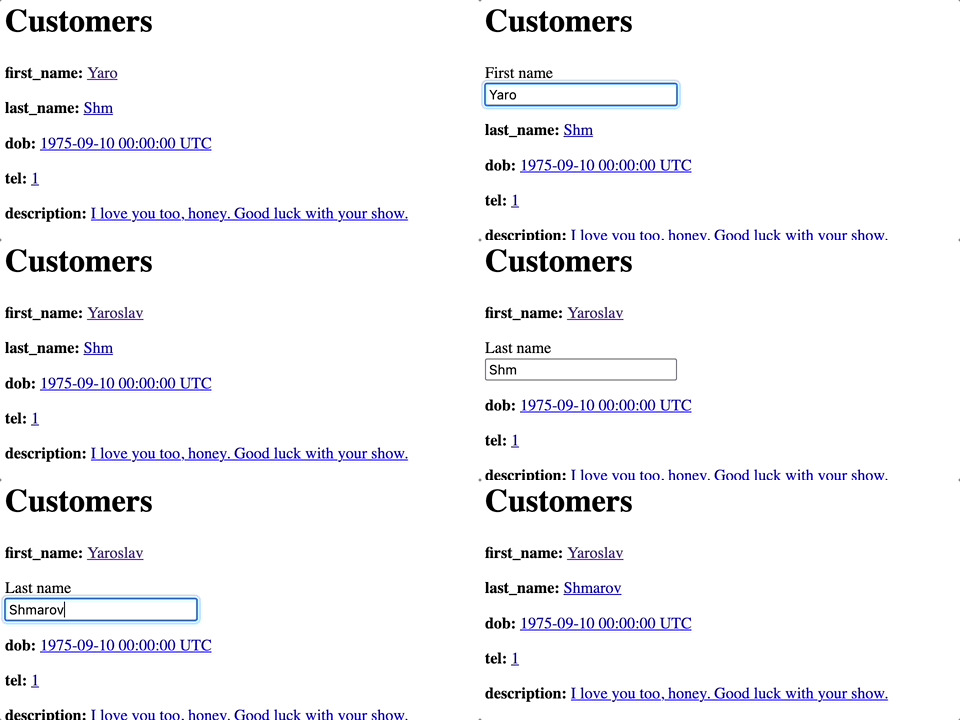
5 years ago I would have used gem best_in_place for this, but now it can be easily achieved with turbo_frames!
List attributes that you want to be inline-editable
```ruby
# app/models/customer.rb
class Customer < ApplicationRecord
INLINE_EDITABLE_ATTRS = [:first_name, :last_name, :dob, :tel, :description]
validates :first_name, presence: true
end
```
Render each inline-editable field inside a separate `turbo_frame`. Redirect to the `edit_customer_path`. Pass the attribute in the url params `attribute: attribute`
```ruby
# app/views/customers/_customer.html.erb
<% Customer::INLINE_EDITABLE_ATTRS.each do |attribute| %>
<%= turbo_frame_tag attribute do %>
<%= attribute %>:
<%= link_to (customer[attribute].presence || 'Edit'), [:edit, customer, attribute: attribute] %>
<% end %>
<% end %>
<% customer.errors.each do |error| %>
- <%= error.full_message %>
<% end %>
<% end %>
<% if params[:attribute].eql? 'first_name' %>
<%= form.label :first_name, style: "display: block" %>
<%= form.text_field :first_name, onchange: 'this.form.requestSubmit()' %>
<% end %>
<% if params[:attribute].eql? 'last_name' %>
<%= form.label :last_name, style: "display: block" %>
<%= form.text_field :last_name, onchange: 'this.form.requestSubmit()' %>
<% end %>
<% if params[:attribute].eql? 'dob' %>
<%= form.label :dob, style: "display: block" %>
<%= form.datetime_field :dob, onchange: 'this.form.requestSubmit()' %>
<% end %>
<% if params[:attribute].eql? 'tel' %>
<%= form.label :tel, style: "display: block" %>
<%= form.number_field :tel, onchange: 'this.form.requestSubmit()' %>
<% end %>
<% if params[:attribute].eql? 'description' %>
<%= form.label :description, style: "display: block" %>
<%= form.text_area :description, onchange: 'this.form.requestSubmit()' %>
<% end %>
<%= form.submit %>
<% end %>
<% end %>
```
Finally, you can use both the attribute-edit form and the normal form. Just render the normal fomr if no `params[:attribute]` is present:
```ruby
# app/views/customers/edit.html.erb
<% if params[:attribute].present? %>
<%= render "inline_attribute_form", customer: @customer %>
<% else %>
<%= render "form", customer: @customer %>
<% end %>
```
That's it! 🎉🥳🍾