---
title: "#19 FORM_WITH: conditionally respond with html OR turbo_stream"
author: "Yaroslav Shmarov"
date: "2021-12-28"
canonical_url: "https://blog.superails.com/form-with-html-or-turbo_stream"
markdown_url: "https://blog.superails.com/form-with-html-or-turbo_stream.md"
description: "Previously we made button_to respond with HTML or TURBO_STREAM. Now, we will make a form_with respond with or HTML or TURBO_STREAM."
tags: ["ruby-on-rails-7","hotwire","turbo","form_with"]
license: "GNU AGPL v3. Credit Yaroslav Shmarov and link the canonical URL."
---
# #19 FORM_WITH: conditionally respond with html OR turbo_stream
Previously we made `button_to` respond with HTML or TURBO_STREAM.
Now, we will make a `form_with` respond with or HTML or TURBO_STREAM.
Example:
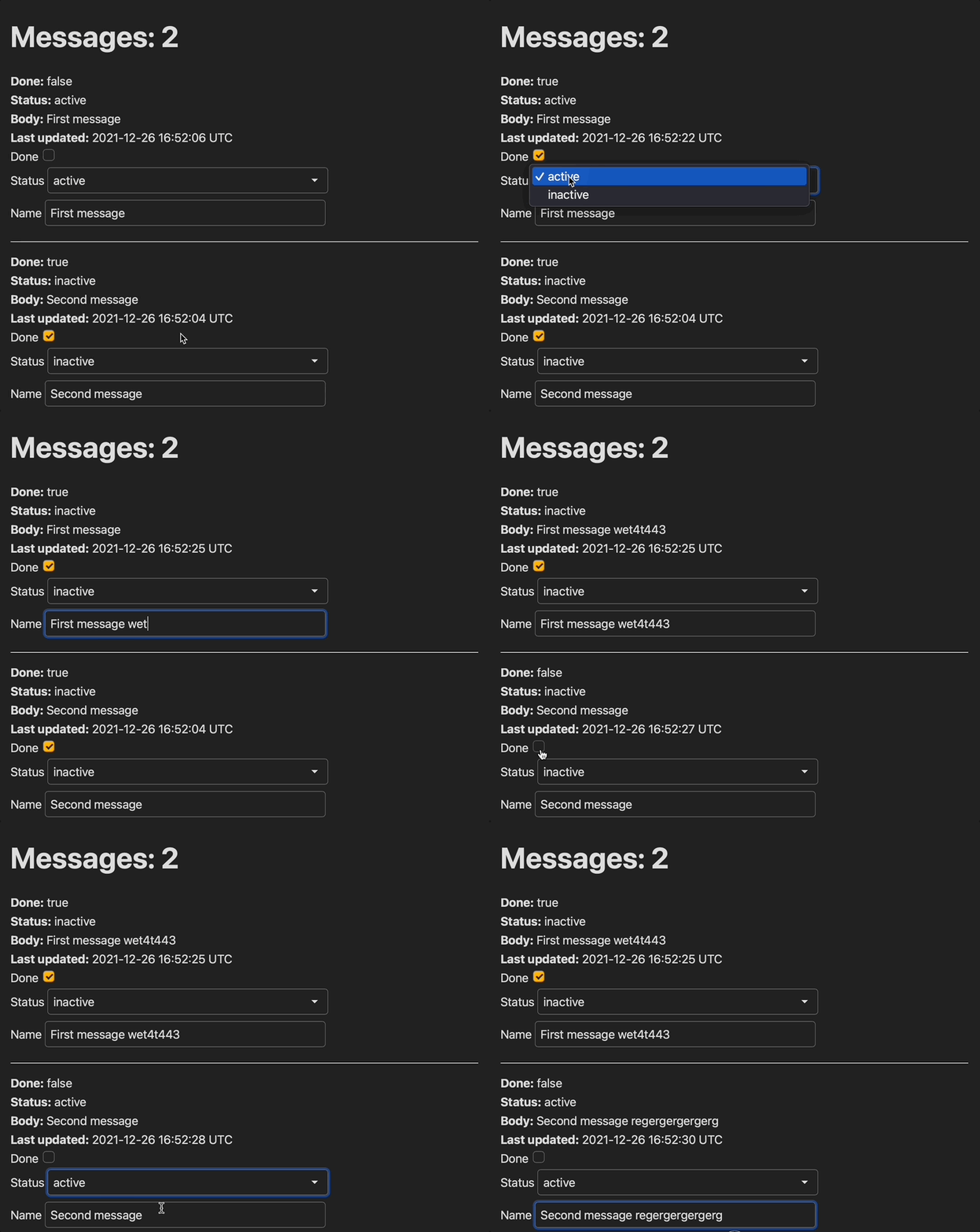
* Submit form without page refresh
* Trigger turbo_stream update
### 0. Initial setup
```ruby
rails g scaffold message body:text status:string done:boolean
```
It's good to add some defaults:
* `default: "active", null: false` to `status`
* `default: false, null: false` to `done`
So the migration will look like this:
```ruby
# db/migrate/20211225112627_create_messages.rb
class CreateMessages < ActiveRecord::Migration[7.0]
def change
create_table :messages do |t|
t.text :body
t.string :status, default: "active", null: false
t.boolean :done, default: false, null: false
t.timestamps
end
end
end
```
```ruby
# app/models/message.rb
STATUSES [:active, :inactive]
```
### 1. respond_to format in a form
Feel frree to add a form inside the message partial!
And you can define the format that you want the form to respond_to in the URL params.
You can also add `'this.form.requestSubmit();'` to submit the form whenever anything changes!
```ruby
# app/views/messages/_message.html.erb
<%= message.done %>
<%= message.status %>
<%= message.body %>
<%= message.updated_at %>
<%= form_with model: message, url: message_path(message), format: :turbo_stream, method: :put do |form| %>
<%= form.check_box :done, onchange: 'this.form.requestSubmit();' %>
<%= form.select :status, Message::STATUSES, {}, onchange: "this.form.requestSubmit()" %>
<%= form.text_field :body, oninput: "this.form.requestSubmit()" %>
<%#= form.submit %>
<% end %>
```
Add the format.turbo_stream responce in the controller to re-render `_message.html.erb` whenever you submit anything in the form:
```ruby
# app/controllers/messages_controller.rb
def update
respond_to do |format|
if @message.update(message_params)
format.html { redirect_to @message, notice: "Message updated." }
format.turbo_stream do
render turbo_stream: turbo_stream.update(@message, partial: "messages/message", locals: {message: @message})
end
else
format.html { render :edit, status: :unprocessable_entity }
end
end
end
```
However now your regular create/edit form will also try to respond to TURBO_STREAM by default (and not do the redirect).
Fix it by specifying a format to respond to:
```diff
# app/views/messages/_form.html.erb
--<%= form_with(model: message) do |form| %>
++<%= form_with(model: message, format: :html) do |form| %>
```
Perfect! Now you know how to respond to either HTML or TURBO_STREAM in a form!
### 2. Next step: re-render fields, not form
In the first scenario, each time you change anything in the form the whole `_message` partial gets re-rendered, including the form!
So each time you type something in the text_field, you lose focus:
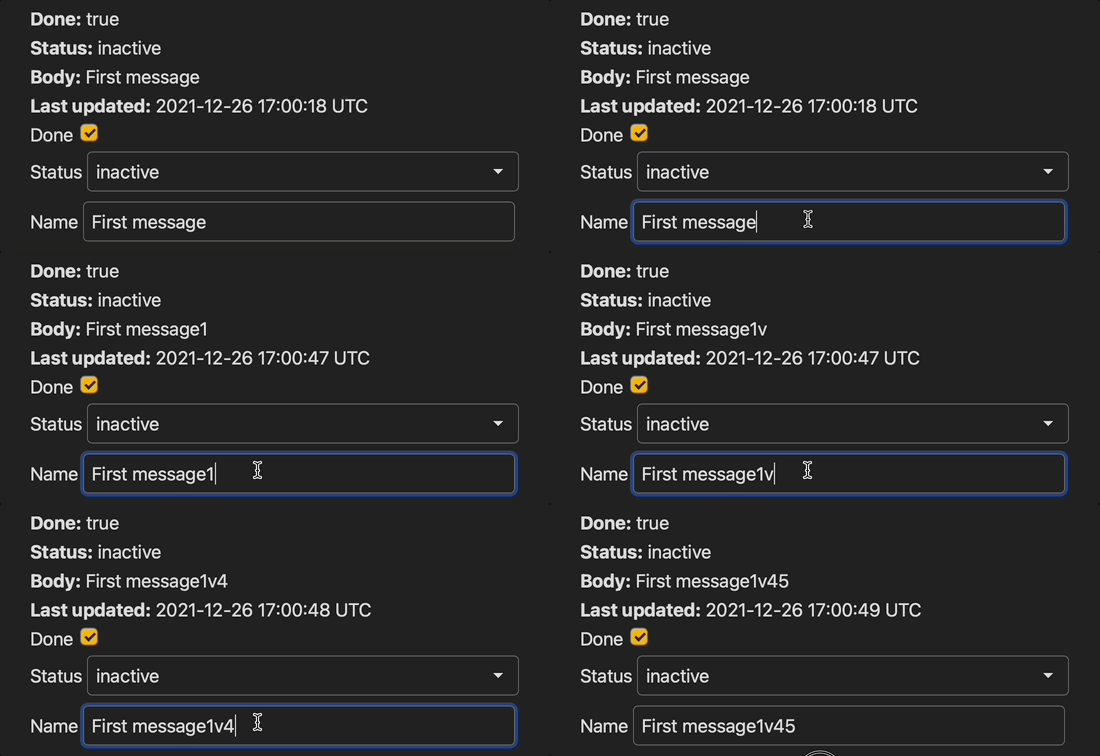
Let's fix this!
First, move the html that you want to re-render with TURBO into a separate partial:
```ruby
# app/views/messages/_attribute_list.html.erb
Done:
<%= message.done %>
Status:
<%= message.status %>
Body:
<%= message.name %>
Last updated:
<%= message.updated_at %>
```
Render the `attribute_list` inside the `message` partial:
```ruby
# app/views/messages/_message.html.erb
<%= render 'messages/attribute_list', message: message %>
<%= form_with model: message, url: message_path(message), format: :turbo_stream, method: :put do |form| %>
<%= form.check_box :done, onchange: 'this.form.requestSubmit();' %>
<%= form.select :status, Message::STATUSES, {}, onchange: "this.form.requestSubmit()" %>
<%= form.text_field :name, oninput: "this.form.requestSubmit()" %>
<%#= form.submit %>
<% end %>
```
Re-render only the `attribute_list`. Not the `messages` partial!
```diff
# app/controllers/messages_controller.rb
def update
respond_to do |format|
if @message.update(message_params)
format.html { redirect_to @message, notice: "Message updated." }
format.turbo_stream do
-- render turbo_stream: turbo_stream.update(@message, partial: "messages/message", locals: {message: @message})
++ render turbo_stream: turbo_stream.update(ActionView::RecordIdentifier.dom_id(@message, :attributes_target), partial: "messages/attribute_list", locals: {message: @message})
end
else
format.html { render :edit, status: :unprocessable_entity }
end
end
end
```
Perfect! Now when you auto-submit the form on input, you won't lose focus!
### 3. IMPORTANT UPDATE (05.01.2021)
According to the [form_with docs](https://apidock.com/rails/v6.1.3.1/ActionView/Helpers/FormHelper/form_with){:target="blank"}, you should use **either** `url` or `format`. Meaning, the below can lead to unexpected behavior:
```ruby
<%= form_with model: message, url: message_path(message), format: :turbo_stream, method: :put do |form| %>
```
So in case you want to respond with `format: :turbo_stream`, you don't have to specify a format at all, because a non-`get` request will try to respond with turbo_stream by default (and then fallback to html):
```ruby
<%= form_with model: message, url: message_path(message), method: :put do |form| %>
```
However if you do want the form to respond with **HTML**, you might want to do it like this:
```ruby
<%= form_with model: message, url: message_path(message, format: :html), method: :put do |form| %>
```
**Homework**: How would you handle validation errors in the this turbo form?