---
title: "HTML to PDF in Rails with gem DocRaptor (successor of wicked_pdf)"
author: "Yaroslav Shmarov"
date: "2023-12-02"
canonical_url: "https://blog.superails.com/docraptor-html-to-pdf"
markdown_url: "https://blog.superails.com/docraptor-html-to-pdf.md"
description: "I often design PDFs for emailing tickets, invoices, certificates, reports. Heck, I even had the whole business idea of building CertificateOwl that is centered…"
tags: ["rails","pdf","wicked_pdf","active-storage"]
license: "GNU AGPL v3. Credit Yaroslav Shmarov and link the canonical URL."
video_url: "https://www.youtube.com/watch?v=i_cNw4APRDg"
---
# HTML to PDF in Rails with gem DocRaptor (successor of wicked_pdf)
I often design PDFs for emailing tickets, invoices, certificates, reports. Heck, I even had the whole business idea of building [CertificateOwl](https://www.youtube.com/watch?v=C3fB8LzNst8&t=1193s) that is centered around generating and sending PDFs!
**Todays mission:** _"When an invoice is created, generate a PDF and email it to the client"_. Example:
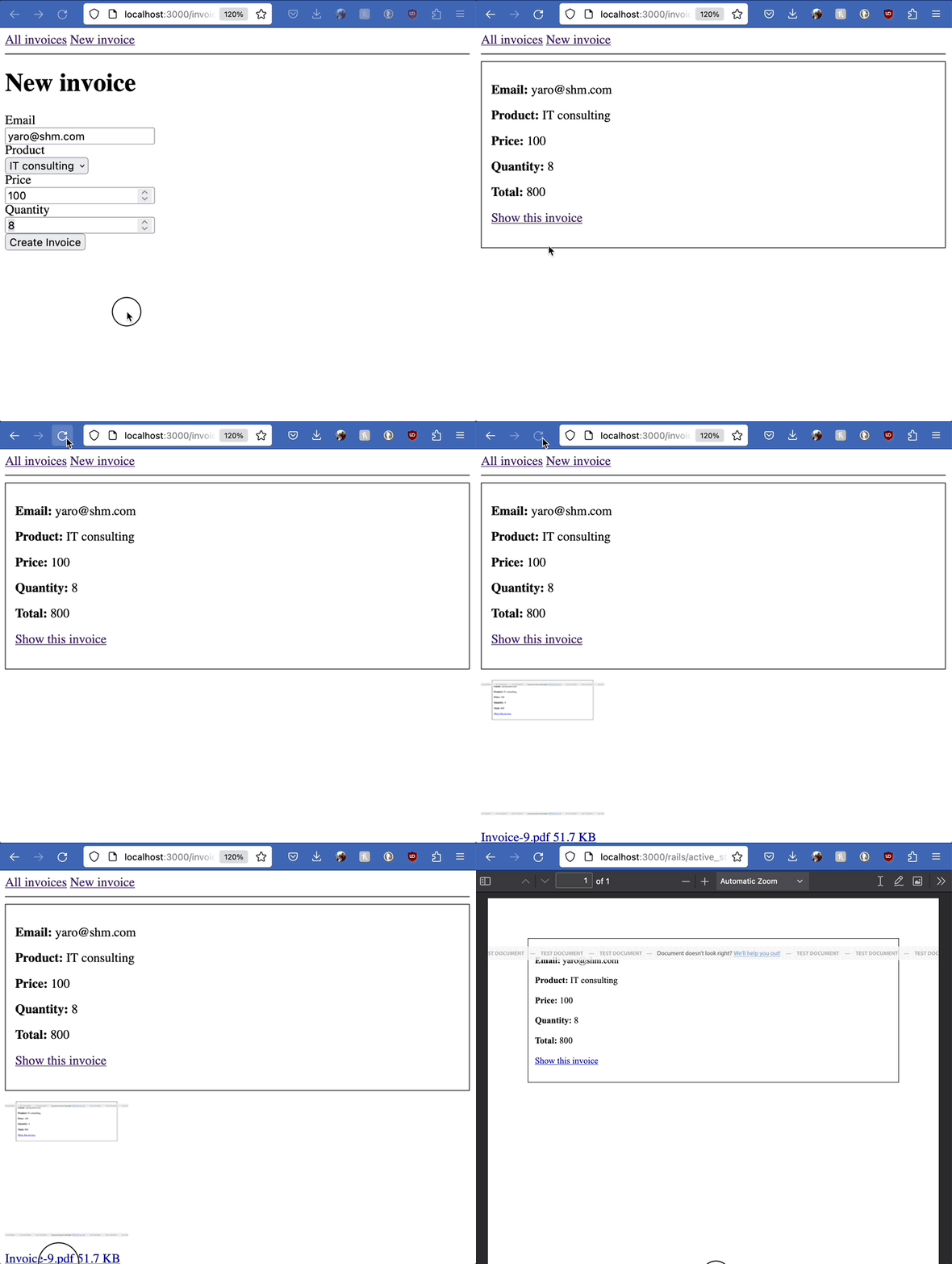
How would you do that?
Usually I would:
- **generate** PDF from HTML with **gem wicked_pdf**
- **store** the PDF with **ActiveStorage**
- **send** the PDF with **ActionMailer**
But there's a problem:
### 1. 💀 Gem WickedPDF is dead.
Since 2015 I have always relied on the [gem wicked_pdf](https://blog.superails.com/gem-wicked-pdf){:target="blank"} for generating PDFs out of my HTML templates. With wicked_pdf, we could design an `app/views/invoices/show.pdf.erb` HTML document, and `format.pdf` would render more-less what we designed. Designing PDFs felt like _WYSIWYG_ (what you see is what you get).
**However** in 2023 the underlying technology behind this gem, [wkhtmltopdf](https://github.com/wkhtmltopdf/wkhtmltopdf), has been **archived**. This means that `gem "wicked_pdf"` is [**no longer recommended**](https://github.com/mileszs/wicked_pdf/issues/1081#issuecomment-1781918070) for any new projects. In fact, we should consider replacing it in existing projects!
### 2. So, what are the alternatives?
1. [Gem DocRaptor](https://github.com/DocRaptor/docraptor-ruby) - ruby API wrapper around the advanced [Prince]() HTML-to-PDF technology.
2. [Gem Prawn](https://github.com/prawnpdf/prawn) - DSL to script PDF documents with plain Ruby.
3. [Gem Ferrum](https://github.com/rubycdp/ferrum) - virtual "headless" browser opens a page in "Print"/"Save to PDF" view.
While **Prawn** and **Ferrum** offer _fundamentally_ different approaches to generating PDF, I think **DocRaptor** might be the the best **"plug-and-play"** replacement for wicked_pdf, because it uses the same technological principle (HTML-to-PDF).
I think that [CSS Paged Media](https://docraptor.com/css-paged-media) is the killer feature of DocRaptor/Prince technology: it allows us to have maximum CSS control of what is rendered on a single PDF page.
By the way, I first casually heard about DocRaptor on [IndieRails Podcast: Matt Gordon - Going from Consulting to Products](https://www.indierails.com/15). Let's give it a try!
### 3. [DocRaptor.com](https://docraptor.com/) basic usage
Useful resources:
- [DocRaptor Ruby docs](https://docraptor.com/documentation/ruby)
- [Gem DocRaptor](https://github.com/DocRaptor/docraptor-ruby)
Add the gem:
```ruby
# Gemfile
gem "docraptor"
```
Create a job that would generate a PDF for an `Invoice` record.
`DocRaptor::DocApi.new.create_doc` makes an API request to DocRaptor.
The API request will try to turn the `app/views/invoices/show.html.erb` template into PDF.
The API response will be saved locally as a PDF in your apps' root folder.
```ruby
# rails g job Invoices::ToPdf
# app/jobs/invoices/to_pdf_job.rb
DocRaptor.configure do |config|
config.username = "YOUR_API_KEY_HERE" # THIS key works in test mode!
end
class Invoices::ToPdfJob < ApplicationJob
queue_as :default
def perform(invoice)
# document_content = ActionController::Base.render( # bad
document_content = ApplicationController.render(
template: 'invoices/show',
# layout: 'layouts/application', # in development fails with "File system access is not allowed"
layout: 'layouts/pdf',
assigns: { invoice: }
)
response = DocRaptor::DocApi.new.create_doc(
test: true,
document_type: "pdf",
document_content: document_content,
)
# Generate a unique filename for each invoice PDF
filename = "invoice_#{invoice.id}.pdf"
# Save the PDF locally
File.write(filename, response, mode: "wb")
puts "Successfully created #{filename}!"
rescue StandardError => error
puts "#{error.class}: #{error.message}"
end
end
```
Now you can run this job whenever an invoice is created:
```ruby
# app/models/invoice.rb
after_create_commit do
Invoices::ToPdfJob.perform(self)
end
```
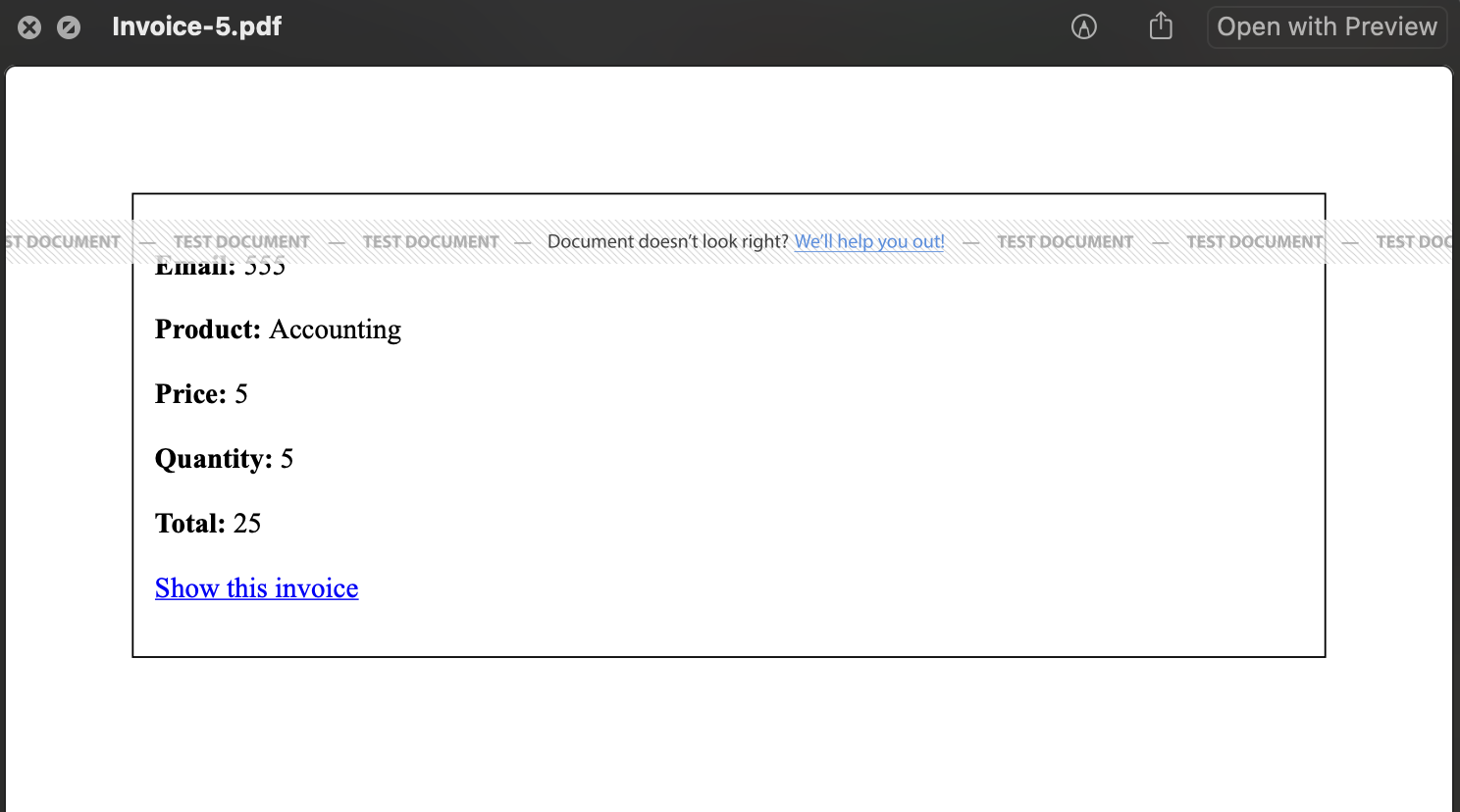
Inside the root folder of your app you will have a downloaded PDF! It will look more-less like this:
### 4. FIX ERROR: `File system access is not allowed.`
The DocRaptor API does not have access to these assets inside your `localhost:3000` app by default:
```ruby
# app/views/layouts/application.html.erb
<%= stylesheet_link_tag "application", "data-turbo-track": "reload" %>
<%= javascript_importmap_tags %>
```
The official docs [suggest](https://docraptor.com/documentation/article/1986775-development-testing-localhost-servers) using Ngrok.
My easiest solution: create a separate PDF layout that will not contain internal asset path.
```html
DocraptorHtmlToPdf
<%= yield %>
```
### 5. Store PDFs in ActiveStorage
Normally you will want to store generated PDFs in app/cloud storage (not local file storage). Let's do it!
Install ActiveStorage:
```shell
rails active_storage:install
rails db:migrate
```
Declare the ActiveStorage association on the Invoice model:
```ruby
# app/models/invoice.rb
has_one_attached :pdf_document
```
Finally, instead of storing a file locally, upload it to ActiveStorage!
```diff
# app/jobs/invoices/to_pdf_job.rb
# Save the PDF locally
- File.write(filename, docraptor_api_response, mode: "wb")
# Save in active storage
+ invoice.pdf_document.attach(io: StringIO.new(docraptor_api_response), filename: filename, content_type: 'application/pdf')
```
Now that we have a generated & attached PDF, we can:
- add Download link
- View metadata (name, size, format)
- [Preview PDF as image](https://edgeguides.rubyonrails.org/active_storage_overview.html#displaying-images-videos-and-pdfs)
- Send via email
To make PDF _preview_ work, add gem image_processing:
```ruby
# Gemfile
gem "image_processing", ">= 1.2"
```
Now we can display the attached PDF in our views:
```ruby
# invoices/show.html.erb
# download pdf_document
link_to "Download", rails_blob_path(@invoice.pdf_document, disposition: "attachment")
# open pdf_document in browser
link_to "Download", rails_blob_path(@invoice.pdf_document, disposition: "inline")
# metadata
@invoice.pdf_document.representable?
@invoice.pdf_document.url
@invoice.pdf_document.blob.filename
@invoice.pdf_document.blob.content_type
number_to_human_size(@invoice.pdf_document.blob.byte_size)
# preview
image_tag @invoice.pdf_document.representation(resize_to_limit: [100, 100])
image_tag @invoice.pdf_document.preview(resize_to_limit: [100, 100])
```
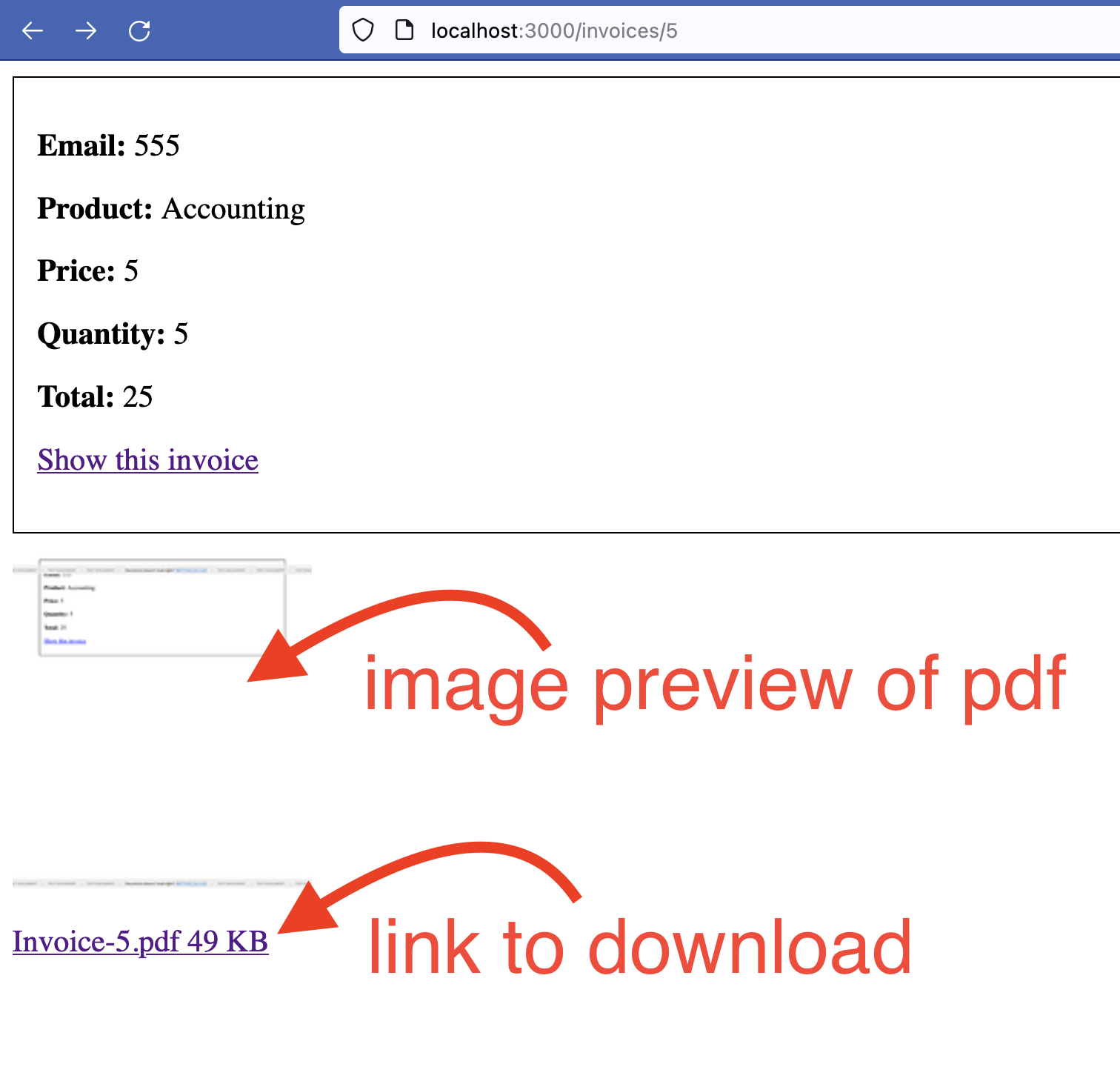
Example image preview of an attached PDF with a link to download it:
```ruby
<% if @invoice.pdf_document.attached? %>
<%= link_to rails_blob_path(@invoice.pdf_document, disposition: "inline") do %>
<% if @invoice.pdf_document.representable? %>
<%= image_tag @invoice.pdf_document.representation(resize_to_limit: [200, 200]) %>
<% end %>
<%= @invoice.pdf_document.blob.filename %>
<%= number_to_human_size @invoice.pdf_document.blob.byte_size %>
<% end %>
<% end %>
```
Will look like this:
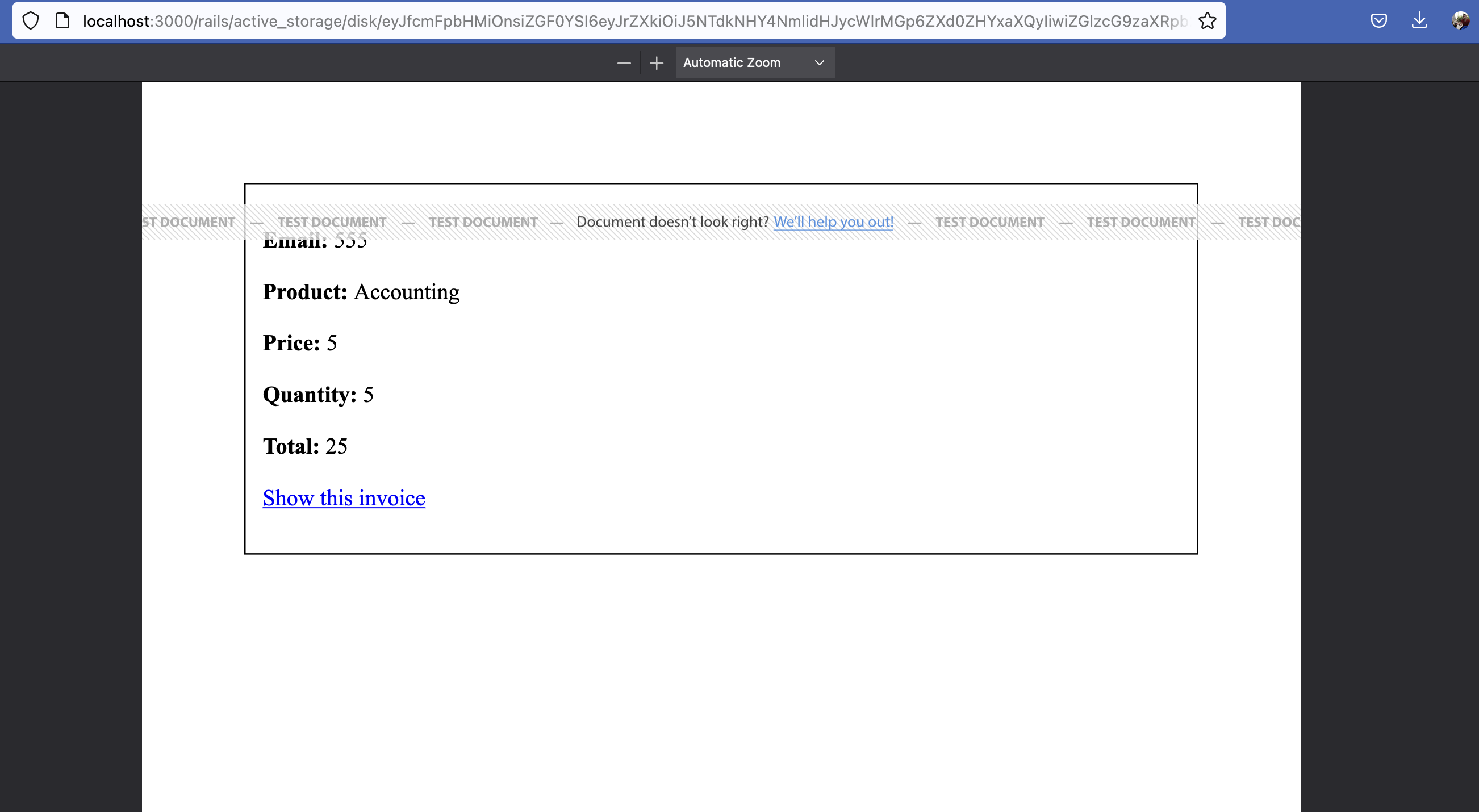
Clicking the link will open the file:
Amazing! What if we want to now email the generated PDF?
### 6. ActionMailer: Send PDF via emai
```ruby
# rails g mailer invoice created
# InvoiceMailer.created(@invoice).deliver_later
class InvoiceMailer < ApplicationMailer
def created(invoice)
@invoice = invoice
# Attach the PDF to the email
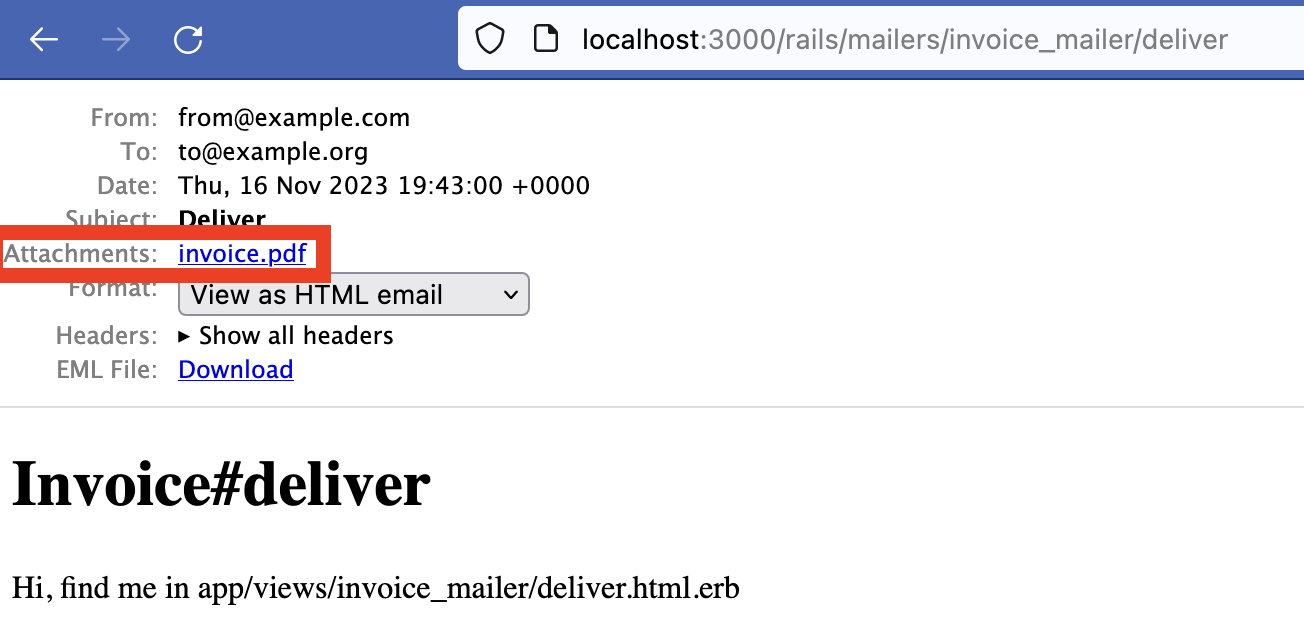
attachments["invoice.pdf"] = invoice.pdf_document.download if invoice.pdf_document.attached?
mail(to: invoice.email, subject: 'Your invoice')
end
end
```
Voila! Now your email will have an attached invoice PDF:
### 7. DocRaptor [document hosting](https://docraptor.com/documentation/api/parameters#hosted)
Are using ActiveStorage only for DocRaptor-generated documents?
You can host generated documents directly with DocRaptor and have fewer dependencies (no need for ActiveStorage, AWS S3...)
According to the docs:
- `.create_doc` returns a pdf string
- `.create_hosted_doc` returns a URL to the hosted document
So we simply replace `create_doc` with `create_hosted_doc`:
```diff
- response = DocRaptor::DocApi.new.create_doc(
+ response = DocRaptor::DocApi.new.create_hosted_doc(
+ invoice.update(pdf_url: response.download_url)
```
We can add a new attribute like `pdf_url` to our `Invoice` and update it.
That's it: now DocRaptor replaced both ActiveStorage and our cloud storage provider!
### 8. URL to PDF
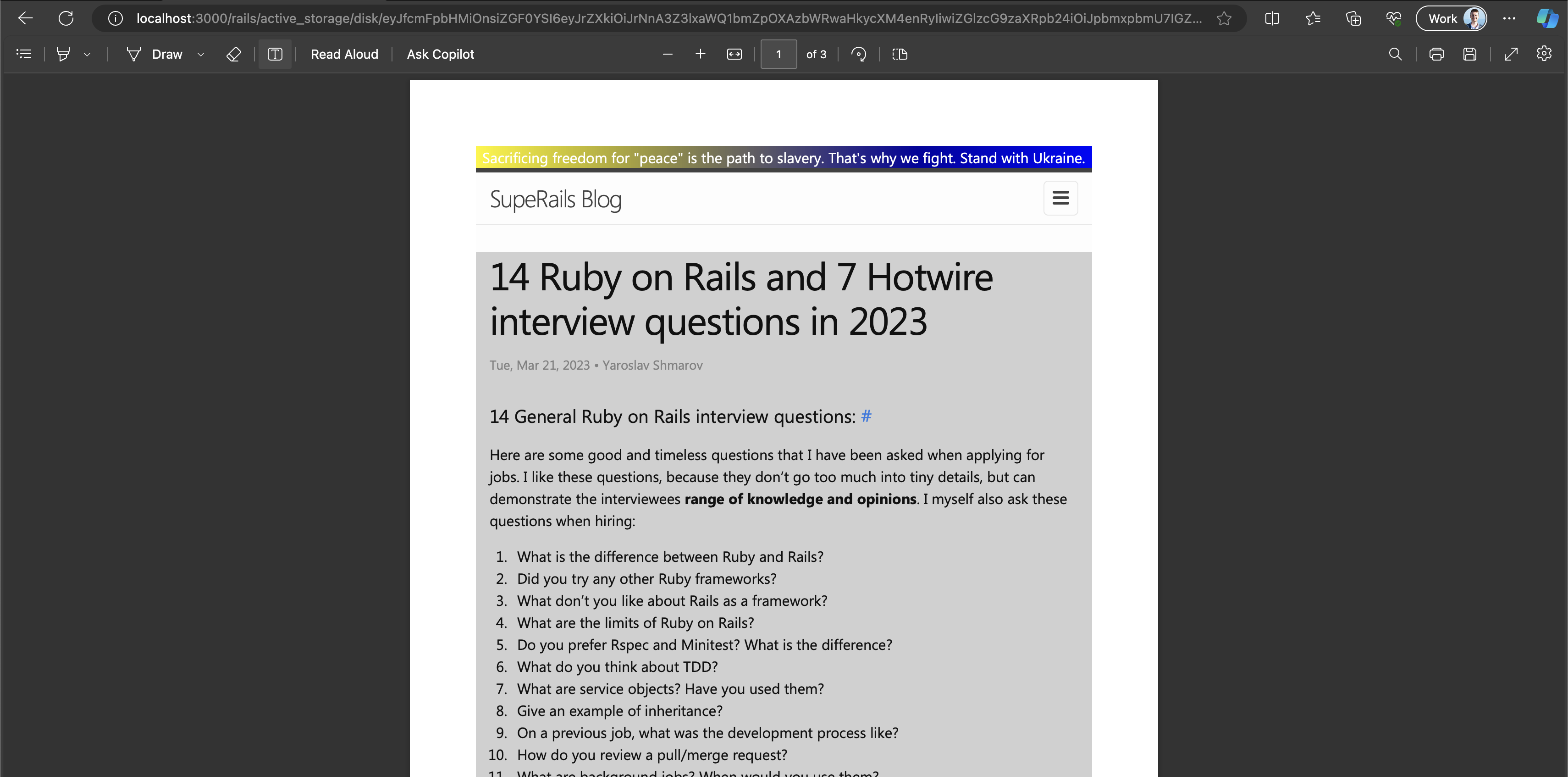
Instead of rendering an internal template, we can create pdf from any **public** url using [document_url](https://docraptor.com/documentation/api#api_document_url):
```diff
# # app/jobs/invoices/to_pdf_job.rb
- document_content: document_content,
+ document_url: 'https://blog.superails.com/ruby-on-rails-developer-interview-questions',
+ document_url: invoice_url(@invoice),
```
### 9. DocRaptor is not free?
To remove the _"TEST DOCUMENT"_ branding from the generated PDFs, we will need to register a DocRaptor account and get an API key:
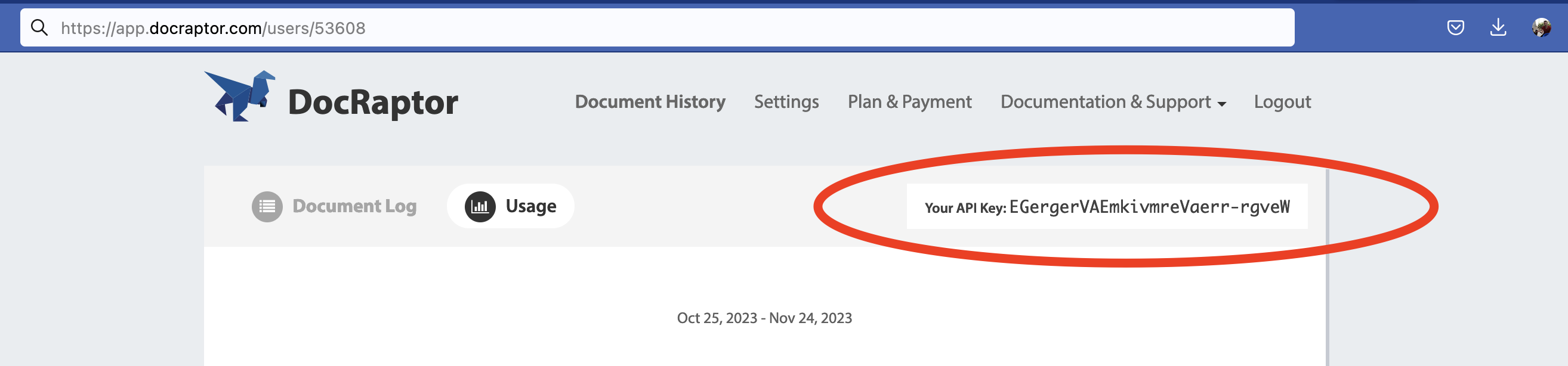
Use `YOUR_API_KEY_HERE` for `development`, and our real API key for `production`:
```diff
- config.username = "YOUR_API_KEY_HERE" # THIS key works in test mode!
+ config.username = "EGergerVAEmkivmreVaerr-rgveW"
```
In a post-wicked_pdf world, I think Prince is the only easy HTML-to-PDF tool.
Prince is a well maintained technology that lets you perform very advanced PDF features.
Purchasing Prince directly is an expensive upfront ~~payment~~ investment:
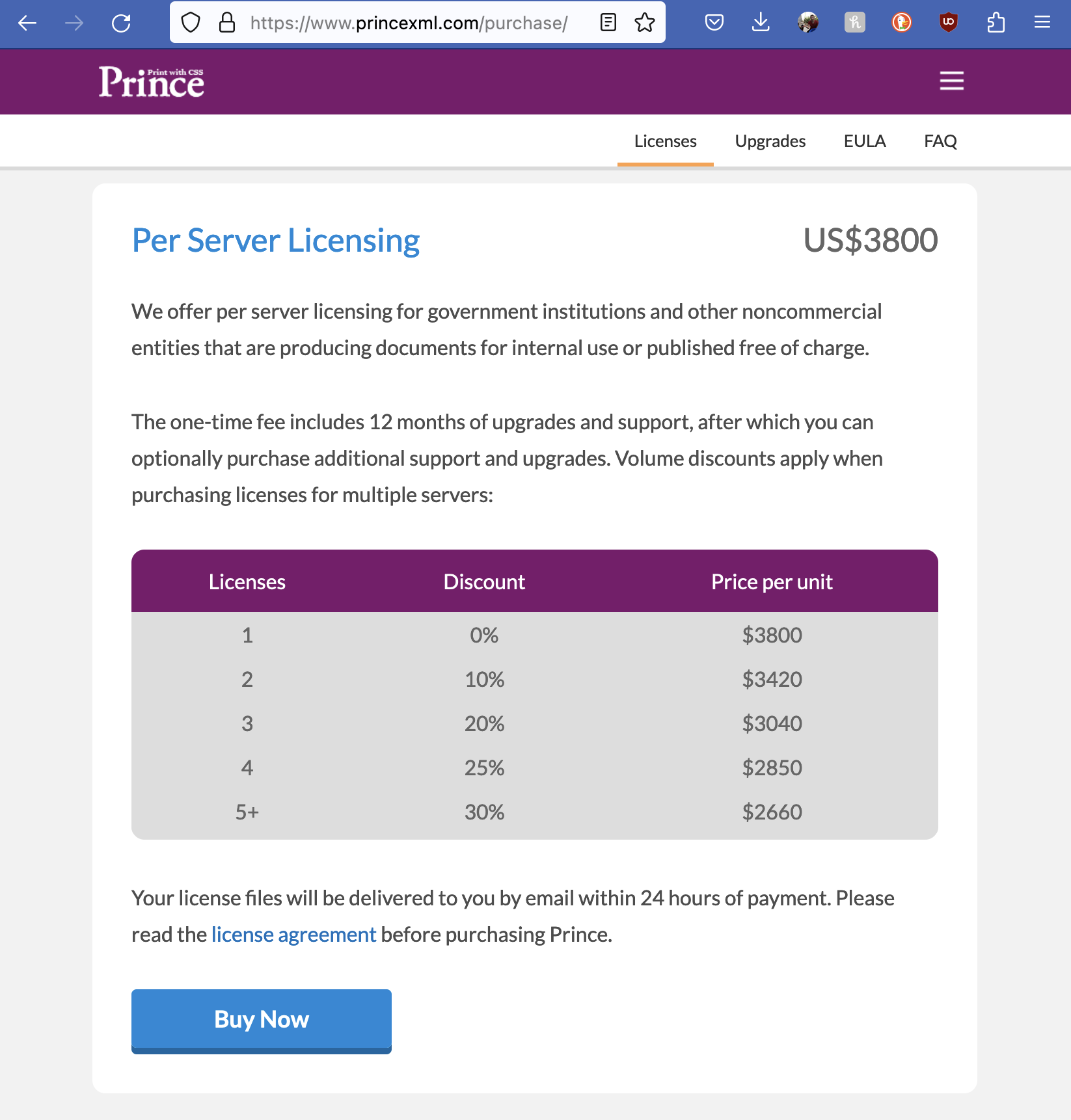
Via DocRaptor, we can get "pay-as-you-go" access to:
- Prince technology
- a Ruby wrapper
- document hosting
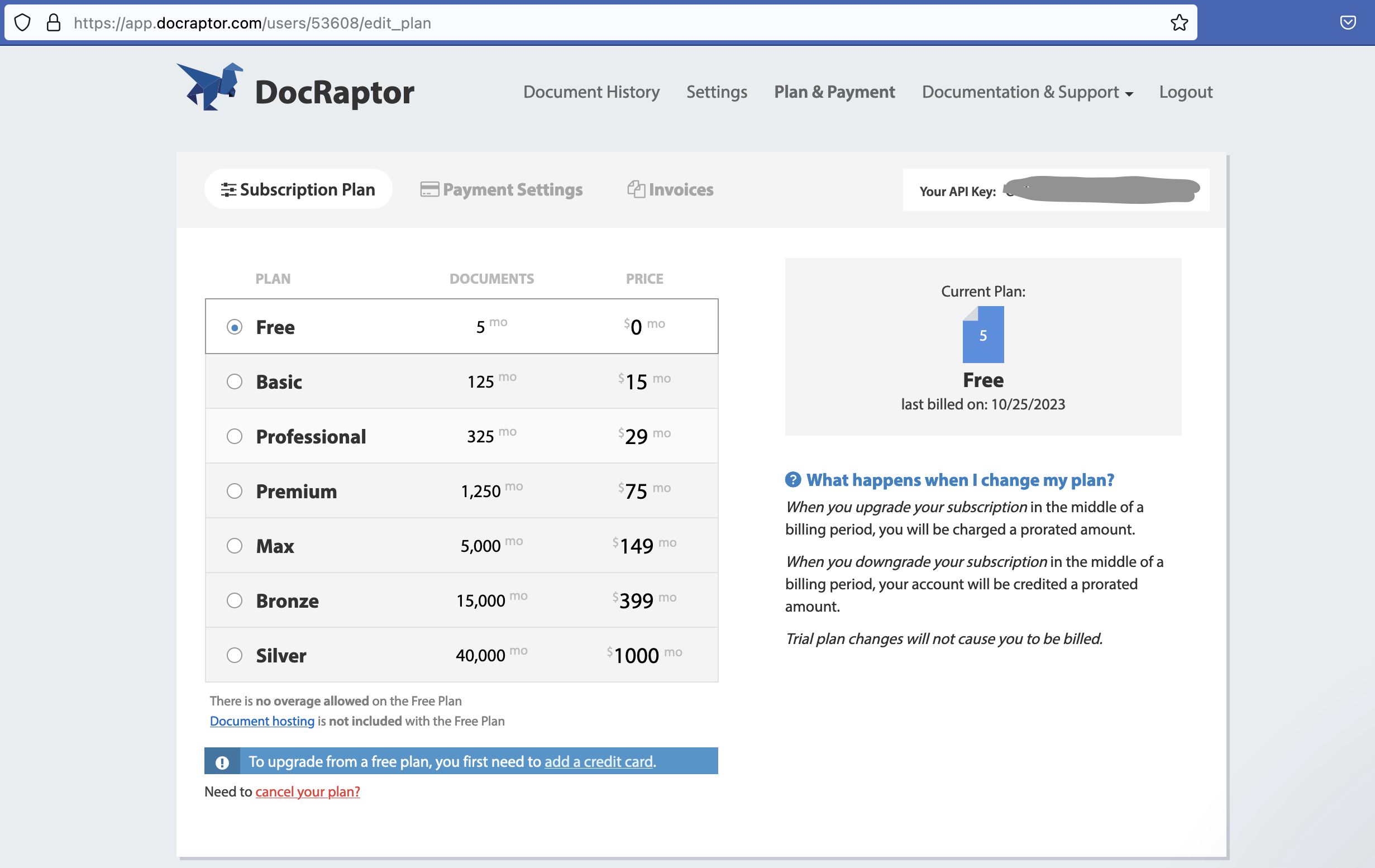
So the price is between `12 cents` and `2,5 cents` per PDF document.
### 10. Final thoughts
- Most often in production you would generate a PDF for an important money-related event (ticket sold, order placed, contract signed, invoice issued). A PDF is the first thing you deliver after a successful online transaction - you want it to be a fulfilling experience for your customer...
- I like the idea of outsourcing PDF generation and hosting.
- We can try to decrease the costs by generate PDF only on demand (when the user clicks a link to "view pdf").
- When I return to building CertificateOwn (my certificate generation app), I will likely use DocRaptor.
- Another thing I did not like about wkhtmltopdf is the giant build size (my Rails app on Heroku without it was 47MB, and with it was 150+MB)